آيفون يخفى ماسحًا ضوئيًا فى هاتفك.. ميزة تغنيك عن تطبيقات المسح المدفوعة
17 أغسطس 2026·اليوم السابع
آيفون يخفى ماسحًا ضوئيًا فى هاتفك.. ميزة تغنيك عن تطبيقات المسح المدفوعة

إذا كنت تعتقد أن مسح المستندات والفواتير ضوئيًا يتطلب تحميل تطبيق متخصص من متجر التطبيقات، فقد لا تحتاج إلى ذلك على الإطلاق ، أجهزة iPhone توفر بالفعل أدوات مدمجة تتيح تحويل الأوراق إلى نسخ رقمية وملفات PDF بسهولة، دون الحاجة إلى تطبيقات خارجية أو اشتراكات إضافية.

تطبيق " الملاحظات" .. ماسح ضوئي داخل هاتفك

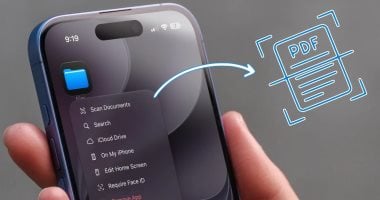
يوفر تطبيق "الملاحظات " طريقة بسيطة لمسح المستندات مباشرة باستخدام كاميرا iPhone ، ويمكن الوصول إلى الميزة بسرعة من خلال الضغط مطولًا على أيقونة التطبيق من الشاشة الرئيسية، ثم اختيار "مسح المستندات" .

بعد توجيه الكاميرا نحو الورقة، يستطيع الهاتف التعرف تلقائيًا على حواف المستند والتقاطه، مع إمكانية التقاط الصورة يدويًا إذا لزم الأمر ، كما يمكن إعادة المسح في حال لم تكن النتيجة جيدة، بالإضافة إلى تعديل حدود الورقة بدقة قبل حفظها.

ولا تقتصر الميزة على صفحة واحدة، إذ يمكنك مسح عدة صفحات متتالية وتجميعها في ملف PDF واحد، ما يجعلها مناسبة للفواتير والعقود والمستندات الدراسية والأوراق المهمة.

تطبيق "الملفات "لتنظيم المستندات بسهولة

أما إذا كنت تريد الاحتفاظ بالمستندات داخل مجلدات منظمة، فيمكنك الاعتماد على تطبيق "الملفات"، ومن خلال الضغط مطولًا على أيقونة التطبيق واختيار " مسح المستندات" ، يمكنك تصوير الأوراق ثم تحديد المجلد الذي تريد حفظ الملف بداخله.

وتوجد طريقة أسرع إذا كنت تعرف مسبقًا مكان حفظ المستند ، إذ يمكنك فتح المجلد المطلوب داخل تطبيق الملفات ، ثم الضغط على قائمة النقاط الثلاث واختيار مسح المستندات ، وبذلك يُحفظ الملف مباشرة في المجلد المحدد دون الحاجة إلى نقله لاحقًا.

هذه الأدوات تجعل iPhone قادرًا على أداء المهام الأساسية التي توفرها العديد من تطبيقات المسح الضوئي، مع ميزة إضافية تتمثل في عدم الحاجة إلى تثبيت تطبيق جديد أو دفع رسوم اشتراك، خاصة إذا كان استخدامك يقتصر على مسح المستندات من وقت لآخر.


iPhoneMashtabiOS
الخبر متوفّر باللغات التالية:English
المصدر الأصلي للخبر
اليوم السابع

iPhone hides a scanner in your phone... A feature that will save you from paying for scanning apps

August 17, 2026·Youm7
iPhone hides a scanner in your phone... A feature that will save you from paying for scanning apps

If you think that scanning documents and invoices requires downloading a specialized app from the App Store, you may not need to do so at all. iPhone devices already provide built-in tools that allow you to convert papers into digital copies and PDF files easily, without the need for external apps or additional subscriptions.

“Notes” app... a scanner within your phone

The “Notes” app provides a simple way to scan documents directly using the iPhone camera. You can access this feature quickly by pressing and holding on the app icon from the home screen, then selecting “Scan Documents”.

After directing the camera towards the paper, the phone automatically recognizes the edges of the document and captures it. The image can be captured manually if necessary. If the result is not good, you can rescan it. You can also precisely adjust the boundaries of the paper before saving it.

The feature is not limited to a single page; you can scan several consecutive pages and combine them into one PDF file, making it suitable for invoices, contracts, study documents, and important papers.

“Files” app for easy document organization

If you want to keep your documents in organized folders, you can rely on the “Files” app. By pressing and holding on the app icon and selecting “Scan Documents”, you can take pictures of the papers and then choose the folder where you want to save the file.

There is a faster way if you already know where the document is stored. You can open the required folder within the Files app, then press the three-dot menu and select Erase documents. This will save the file directly to the specified folder without the need for later transfer.

These tools make iPhone capable of performing basic tasks that many scanning apps provide, with an additional advantage of not needing to install a new app or pay subscription fees, especially if your usage is limited to scanning documents from time to time.

iPhoneMashtabiOS
This article is also available in:العربية
Original source article
Youm7