كل ما يجب معرفته قبل وضع مفتاح السيارة على هاتف آيفون
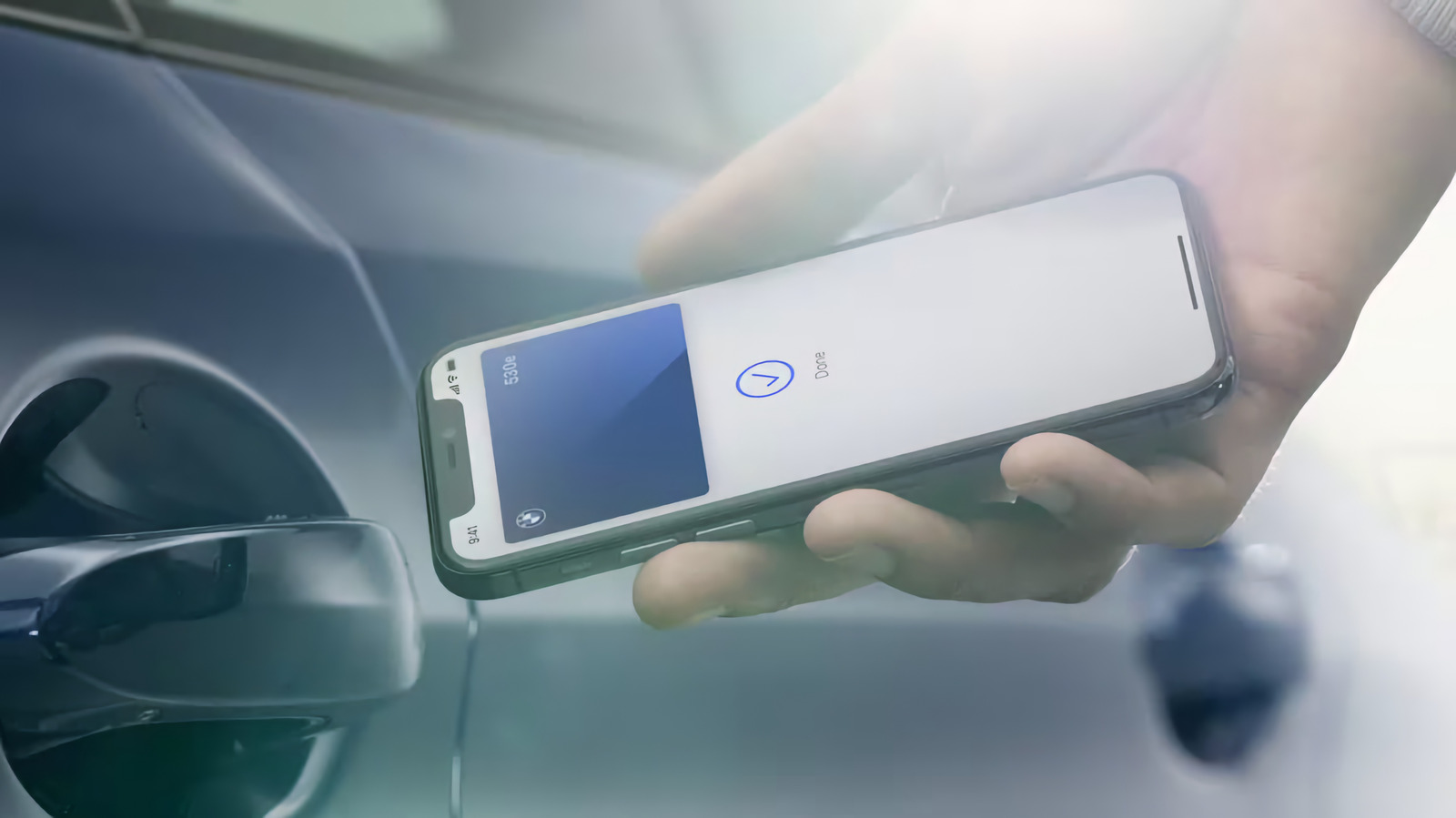
20 يوليو 2026·إنجاجيت
كل ما يجب معرفته قبل وضع مفتاح السيارة على هاتف آيفون

يمكنك الوصول إلى سيارتك دون حتى الحاجة لفتح هاتف الآيفون الخاص بك

بقلم إيان كارلوس كامبل 20 يوليو، 2026 2:30 مساءً بتوقيت شرق الولايات المتحدة شركة بي إم دبليو

مع Apple Pay، ساعدت آبل في جعل النقر على هاتفك عند أجهزة نقاط البيع شائعاً، لكن نفس التكنولوجيا التي تتيح هذا التبادل لها العديد من الاستخدامات الأخرى. مثل نظام أندرويد، مع سيارة متوافقة وبعض الإعدادات، يمكنك استخدام الآيفون لتخزين مجموعة من مفاتيح السيارات الرقمية وفتح أو حتى تشغيل سيارتك بنقرة واحدة.

عند إطلاق ميزة المفتاح الرقمي لشركة آبل في عام 2020، قدمت التوافق مع عدد مختار فقط من السيارات، لكن هذا التوسع بشكل كبير في السنوات التي تلت ذلك. الآن تدعم العديد من العلامات التجارية الشهيرة للسيارات المفتاح الرقمي لشركة آبل، وأصبح أكثر فائدة بكثير. إذا كنت ترغب في إضافة نسخة من مفاتيح سيارتك إلى الآيفون الخاص بك، ولكن لم تكن تعرف ما إذا كانت سيارتك أو جهازك سيعملان معها، إليك كيفية التحقق وإعداد الأمور.

ما هي ميزة CarKey من آبل؟

أضافت شركة آبل دعم مفاتيح السيارات الرقمية في تطبيق Wallet مع إصدار iOS 14. ومن خلال واجهة برمجة التطبيقات (API) الجديدة (في ذلك الوقت)، اكتسب المطورون القدرة على إضافة مفتاح رقمي إلى هواتف iPhone الخاصة بالمستخدمين، والذي يمكنه قفل أو فتح أي مركبة بلمسة واحدة. تم إطلاق الميزة على الأجهزة التي تعمل بنظامي iOS 14 و iOS 13 في نفس الوقت، وقدمت آبل لاحقًا القدرة للجميع الذين يمتلكون iPhone أو Apple Watch مزودًا بشريحة U1 ذات النطاق الترددي الفائق (UWB) لقفل أو فتح السيارات بشكل سلبي عند الاقتراب منها.

يعتمد تطبيق Wallet على نوع سيارتك، حيث يمكنه قفل وفتح وتشغيل سيارتك. وإذا قمت بتمكين ما تسميه آبل "وضع التعبير"، فيمكنه أيضًا القيام بكل هذه الأمور دون الحاجة إلى إخراج هاتفك أولاً وفتحه.

كيف تعمل مفاتيح السيارات الرقمية على نظام iOS؟

تتشابه طريقة تعامل شركة آبل مع مفاتيح السيارات مع جوجل، وتعتمد على مواصفات المفتاح الرقمي التي وضعها اتحاد الاتصال بالسيارة. بمجرد ربط هاتفك وسيارتك، يتم تأمين نسخة رقمية من مفتاحك بشكل مشفر على جهازك. يعمل قفل وفتح السيارة باستخدام شريحة NFC في هاتف iPhone الخاص بك، تمامًا مثل النقر للدفع. يمكن لتوصيل البلوتوث بين هاتفك الذكي وسيارتك فتح وإغلاق سيارتك عن بُعد. يستخدم الدخول السلبي، حيث يقوم هاتفك تلقائيًا بفتح سيارتك عندما تكون قريبًا، البلوتوث وشريحة U1 في هاتفك لتحديد موقعك قبل قفل أبواب السيارة أو تشغيل محركها.

أي هواتف آيفون والسيارات تدعم مفاتيح السيارة الرقمية؟
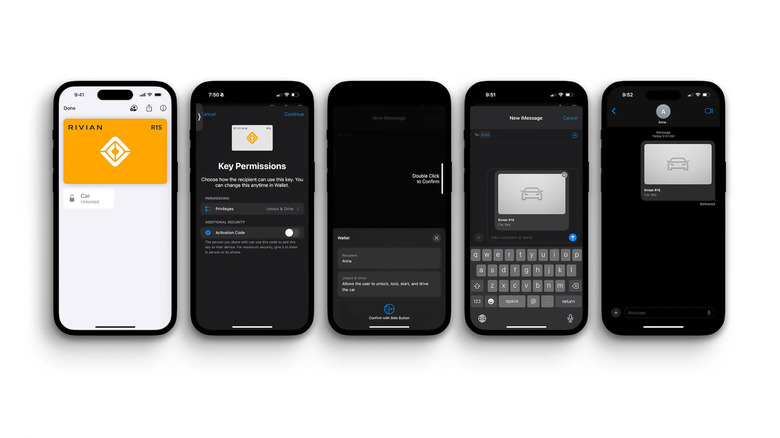
لقطة شاشة لمفتاح رقمي لشركة ريفيان على هاتف آيفون ومشاركة المفتاح مع أشخاص آخرين. ريفيان

على الأقل، تتطلب مفاتيح السيارة الرقمية من شركة آبل هاتف آيفون يعمل بنظام iOS 13 مع شريحة NFC مدمجة. وهذا يعني أنك بحاجة إلى امتلاك إما هاتف آيفون إس إكس أو أحدث أو الجيل الثاني من هاتف آيفون إس إي أو أحدث لاستخدام الميزة.

كانت مفاتيح السيارة الرقمية الخاصة بآيفون متوفرة فقط في طراز بي إم دبليو 5 سيريز عند الإطلاق، لكن العديد من مصنعي السيارات الكبار اعتمدوا هذه الميزة منذ ذلك الحين. على سبيل المثال، يمكنك الآن استخدام المفاتيح الرقمية في سيارات هيونداي توسان، وأيونيك 5 و6، بالإضافة إلى ريفيان R1T و R1S. لا تحتفظ آبل بقائمة بالسيارات التي تدعم المفاتيح الرقمية (بدلاً من توجيه العملاء إلى الاتصال بمصنع السيارة لتأكيد الدعم) ولكن قائمة سياراتها التي تدعم كار بلاي تشير إلى الطرازات التي توفر أيضًا مفاتيح رقمية، لذا يمكنك استخدامها كدليل.

فيما يلي علامات السيارات التي تذكرها آبل على أنها تدعم المفاتيح الرقمية:

  • أودي

  • بي إم دبليو

  • بي واي دي

  • إكسيد

  • جينيسيس

  • هيونداي

  • كيا

  • لوتس

  • مرسيدس-بنز

  • ميني

  • نيو

  • بولستار

  • رام

  • ريفيان

  • فولفو

كيفية إضافة مفتاح سيارتك إلى هاتف iPhone
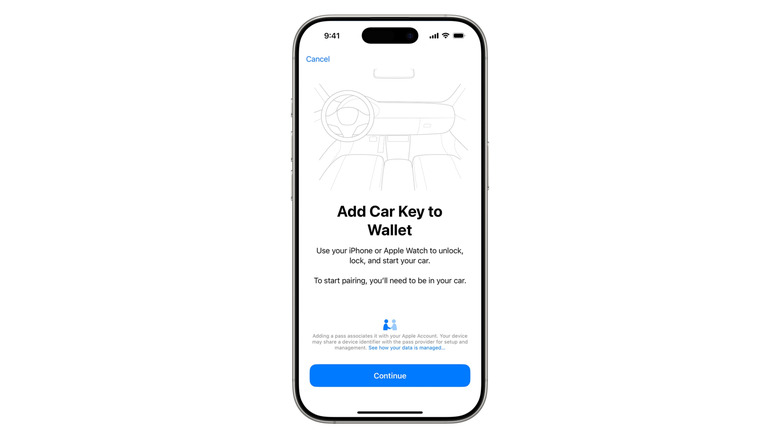
لقطة شاشة للرسالة التي تعرضها تطبيق المحفظة عند إضافة مفتاح سيارة إلى هاتف iPhone.

تختلف طرق إضافة مفاتيح السيارات الرقمية إلى هاتف iPhone من سيارة لأخرى وقد تتطلب منك الاقتراب من سيارتك لتعمل. للأسف، قد تحتاج أيضًا أثناء الإعداد إلى ملامسة هاتفك لمستشعر المفتاح بشكل فعلي، اعتمادًا على السيارة. لا توضح شركة أبل ما إذا كانت هناك سيارات أو ميزات مفتاح سيارة محددة تحدد ما إذا كنت ستتمكن من إعدادها دون الاقتراب من سيارتك.

تختلف عملية بدء تشغيل العملية أيضًا بناءً على العلامة التجارية والطراز. قد تتلقى بريدًا إلكترونيًا أو رسالة نصية من صانع سيارتك تطلب منك إضافة مفتاح، أو قد تتمكن من إضافة مفتاح إلى محفظتك عبر تطبيق صانع السيارة. قد تتطلب عملية الإعداد أيضًا إنشاء حساب مع صانع سيارتك وربطه بسيارتك. عند إرسالك في النهاية إلى تطبيق المحفظة، فإن النقر على "استمرار" ستقوم بمطابقة iPhone بسيارتك. اتبع أي تعليمات على الشاشة لمزامنة شريحة NFC في iPhone مع سيارتك، والتي قد تنطوي في بعض الحالات على النقر عليها لقراءة مفتاح السيارة.

بمجرد المطابقة، يجب أن تتمكن من قفل وفتح سيارتك مباشرةً من تطبيق المحفظة. تقول شركة Apple على صفحة الدعم الخاصة بها إن الوضع التعبيري سيكون مُفعّلًا تلقائيًا أيضًا بحيث ستتم فتح سيارتك دون الحاجة إلى إزالة iPhone من جيبك.

يمكنك أيضًا مشاركة مفتاح عن طريق اختياره في تطبيق المحفظة والنقر على زر "مشاركة". سيُطلب منك تسمية المفتاح، واختيار ما إذا كنت تريد إضافة رمز تنشيط لأغراض أمنية إضافية، ثم تحديد جهة الاتصال التي تريد إرساله إليها. سيسألك تطبيق المحفظة عن مصادقة هويتك قبل إرسال المفتاح. إذا قمت بتعيين رمز تنشيط، فستحتاج إلى إرسال هذا الرمز المُستخدم مرة واحدة إلى جهات الاتصال الخاصة بك حتى يتمكنوا من فتح واستخدام المفتاح.

إذا فقدت هاتف iPhone الخاص بك لأي سبب من الأسباب، فإن وضع علامة "مفقود" عليه في قسم "الأجهزة" من تطبيق "Find My" (إيجاد جهازي) يُلغي تلقائيًا أي مفاتيح رقمية مخزنة لديك. تجدر الإشارة إلى أن أي مفاتيح تشاركها مع الآخرين ستظل قابلة للاستخدام، ولكن هذه هي أبسط طريقة لتأمين هاتفك وتطبيق المحفظة. إذا نفد شحن هاتفك أثناء محاولة فتح سيارتك، فتقول شركة آبل إن المفاتيح والبطاقات والرموز التي تم تمكين وضع التعبير عنها ستظل قابلة للاستخدام لمدة خمس ساعات بعد نفاد البطارية. ومع ذلك، بغض النظر عن السيناريو، يجب عليك الاحتفاظ بنسخة من مفاتيحك الفعلية كنسخة احتياطية.

iPhonecar keydigital key
الخبر متوفّر باللغات التالية:English
المصدر الأصلي للخبر
إنجاجيت

Everything to know before putting a car key on your iPhone

July 20, 2026·Engadget
Everything to know before putting a car key on your iPhone

You can access your car without even having to unlock your iPhone.

By Ian Carlos Campbell July 20, 2026 2:30 pm EST BMW

With Apple Pay, Apple helped make tapping your phone at point of sale terminals ubiquitous, but the same technology that exchange possible has plenty of other uses. Much like on Android, with a compatible car and a bit of setup, you can use your iPhone to store a set of digital car keys and unlock or even start your car with a tap.

When it launched in 2020, Apple's digital car key feature offered compatibility with only a select number of cars, but that has meaningfully expanded in the years since. Now several popular car brands support Apple's digital car key, and it's become a lot more useful. If you've been wanting to add a copy of your car keys to your iPhone, but didn't know if your car or device would work with it, here's how to check and set things up.

What is Apple's CarKey feature?

Apple added support for digital car keys in its Wallet app with the release of iOS 14. Through the new (at the time) CarKey API, developers gained the ability to add a digital key to users' iPhone that can lock or unlock a vehicle with a tap. The feature launched on devices running iOS 14 and iOS 13 simultaneously, and Apple later introduced the ability for anyone with an iPhone or Apple Watch that has a U1 ultra-wideband chip to passively unlock or lock cars when within range.

Depending on your car, the Wallet app can unlock, lock and start your car. And if you enable what Apple calls "Express Mode," it can also do all of those things without you having to first pull out and unlock your phone.

How do digital car keys work on iOS?

Apple's approach to car keys is similar to Google's and is based on the Car Connectivity Consortium's Digital Key specification. Once your phone and car are paired, a digital copy of your key is cryptographically secured on your device. Locking and unlocking a car works using your iPhone's NFC chip, just like tapping to pay. A Bluetooth connection between your smartphone and your car can remotely unlock and lock your car. Passive entry, where your phone automatically unlocks your car when you're nearby, uses Bluetooth and your phone's U1 chip to determine your location before locking your car's doors or starting its engine.

Which iPhones and cars support digital car keys?

Screenshots of a Rivian digital key on the iPhone and sharing the key with other people. Rivian

At a minimum, Apple's digital car keys require an iPhone running iOS 13 with an NFC chip built in. That means you'll need to own either an iPhone XS or later or a second-generation iPhone SE or newer to use the feature.

The iPhone's digital car keys were only available on the BMW 5 Series at launch, but several major car makers have adopted the feature since. For example, you can now use digital keys on Hyundai's Tucson, Ioniq 5 and 6, as well as the Rivian R1T and R1S. Apple doesn't maintain a list of which cars support digital keys (instead directing customers to call their car manufacturer to confirm support) but its list of cars that support CarPlay does note which models also offer digital keys, so you can use that as a guide.

Here are the car brands Apple lists as supporting digital keys:

  • Audi

  • BMW

  • BYD

  • EXEED

  • Genesis

  • Hyundai

  • Kia

  • Lotus

  • Mercedes-Benz

  • Mini

  • Nio

  • Polestar

  • Ram

  • Rivian

  • Volvo

How to add your car key to your iPhone

A screenshot of the prompt the Wallet app displays when you're adding a car key to your iPhone. Apple

Methods for adding digital car keys to your iPhone vary from one car to another and may require you to be near your vehicle to work. Unfortunately, depending on the car, you might also need to physically touch your phone to your key reader during set up. Apple isn't clear if there are specific cars or Car Key features that determine whether you'll be able to set things up without being next to your vehicle.

The initiation of the setup process also differs based on make and model. You might receive an email or text message from your car maker prompting you to add a key, or you might be able to add a key to your Wallet through your car maker's app. The setup process may also require you to create an account with your car maker and associate it with your car. When you're eventually sent to the Wallet app, tapping Continue will pair your iPhone with your car. Follow any onscreen instructions to sync the NFC chip in your iPhone with your car, which in some cases may involve tapping it to your car's key reader.

Once paired, you should be able to lock and unlock your car directly from the Wallet app. Apple says on its support page that Express Mode will also automatically be enabled so your car will unlock without you having to remove your iPhone from your pocket.

You can also share a key by selecting it in the Wallet app and tapping on the Share button. You'll be prompted to name the key, choose whether to add an activation code for extra security and then select a contact to send it to. The Wallet app will ask you to authenticate your identity before sending the key. If you did set an activation code, you'll have to send that one-time code to your contact so they can unlock and use the key.

If for whatever reason you lose your iPhone, marking it as lost in the Devices section of the Find My app automatically disables any digital keys you have stored. Notably, any keys you've shared will still be usable, but it's otherwise the simplest way to lock down your phone and Wallet app. If your phone happens to run out of juice when you need to unlock your car, Apple says certain keys, cards and passes with Express Mode enabled will be still usable for five hours after your battery dies. Regardless of the scenario, though, you should keep a copy of your actual keys as a backup.

iPhonecar keydigital key
This article is also available in:العربية
Original source article
Engadget