كيفية طلب استرداد أموال إكس بوكس
15 أغسطس 2026·إنجاجيت
كيفية طلب استرداد أموال إكس بوكس

إذا اشتريت لعبة عن طريق الخطأ، فهناك أمل.

بقلم حسين برويز 15 أغسطس 2026 12:30 مساءً EST Irina Bauer/Shutterstock

اشتريت اللعبة الخاطئة أو تريد استرداد أموالك مقابل اشتراك إكس بوكس؟ إليك ما يجب فعله.

قد تحدث ندم المشتري الرقمي بسرعة ملحوظة. ربما بدت اللعبة أفضل بكثير في الإعلان الترويجي، أو اشتريت الطبعة الخاطئة، أو لاحظت أخيرًا أن الاشتراك يجدد بهدوء في الخلفية.

لحسن الحظ، لا تكون عملية شراء إكس بوكس دائمًا رحلة ذهاب فقط. تقبل مايكروسوفت طلبات الاسترداد للألعاب الرقمية المؤهلة، والتطبيقات، والإضافات، وبعض المشتريات الأخرى، في حين أن اشتراكات إكس بوكس لديها عملية إلغاء واسترداد خاصة بها. ومع ذلك، هناك شروط، ولا يعيد الشراء عن طريق الخطأ الأموال تلقائيًا إلى حسابك المصرفي.

كيفية استرداد لعبة على إكس بوكس
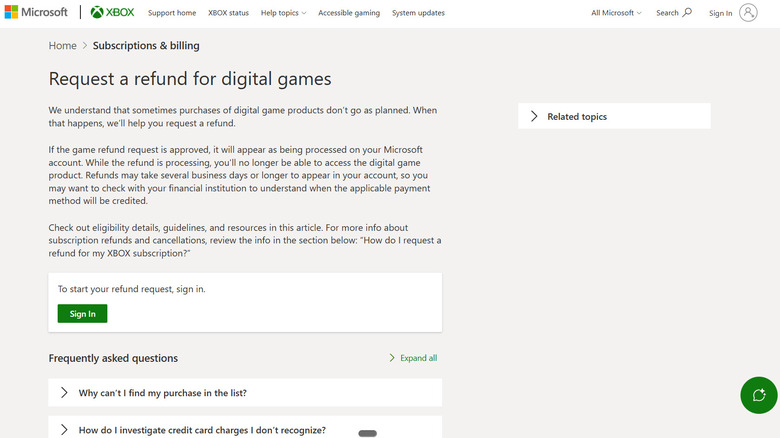
شاشة طلب الاسترداد على إكس بوكس. Engadget

لا تحتاج للبحث في لوحة تحكم إكس بوكس عن قائمة استرداد مخفية. يتم التعامل مع طلبات استرداد الألعاب الرقمية عبر دعم إكس بوكس عبر الإنترنت.

  1. انتقل إلى صفحة طلب استرداد لألعاب رقمية وقم بتسجيل الدخول.
  2. اختر اللعبة أو عملية الشراء الأخرى المؤهلة التي تريد استردادها.
  3. اختر طلب استرداد.
  4. أخبر مايكروسوفت سبب الطلب، ثم اختر التالي.
  5. تحقق من صحة كل شيء واختر إرسال.

إذا وافق إكس بوكس على الاسترداد وبدأ في معالجته، فستفقد أيضًا إمكانية الوصول إلى منتج اللعبة الرقمية.

ما عمليات شراء إكس بوكس المؤهلة للاسترداد؟

حسنًا، هنا تصبح الأمور أقل تلقائية.

تقول إكس بوكس إن استرداد أموال الألعاب الرقمية يتم عادة إذا تم تقديم الطلب خلال 14 يومًا من الشراء ولم يتراكم للاعب "مبلغ كبير" من وقت اللعب. لا تحدد مايكروسوفت بالضبط ما الذي يعتبره مبلغًا كبيرًا، لذا لا يوجد عدد ساعات منشور يضمن لك استرداد أموالك.

كما أن المدة الإرشادية البالغة 14 يومًا ليست نهاية الطريق المطلقة. تسمح إكس بوكس بتقديم طلبات استرداد الألعاب خلال 90 يومًا من الشراء، على الرغم من أن مايكروسوفت توضح أنه لن يتم قبول كل الطلبات، ويمكنها فرض حدود على عدد أو نوع أو القيمة النقدية للاستردادات الممنوحة لمشتري فردي خلال عام.

تغطي السياسة عروض الألعاب الرقمية من متجر مايكروسوفت، وتطبيقات إكس بوكس (باستثناء تطبيقات الأفلام والتلفزيون)، ومجموعات الألعاب الرقمية، ومحتوى الألعاب الدائمة وبعض المحتويات الاستهلاكية. تتوقف معظم العناصر الاستهلاكية داخل اللعبة والعملة الافتراضية عن كونها قابلة للاسترداد بمجرد شرائها أو استخدامها.

يحصل الطلب المسبق على مخرجته الخاصة الصغيرة. تقول إكس بوكس إنه يمكنك إلغاء طلب لعبة رقمية مسبقة من خلال تاريخ الطلب الخاص بك حتى 10 أيام قبل الإطلاق؛ بمجرد حدوث عملية الفوترة، قد تحتاج إلى طلب استرداد بدلاً من ذلك.

كيفية الحصول على استرداد اشتراك إكس بوكس
منظر من الأعلى لشاشة الهاتف مع شعار لعبة باس إكس بوكس، جهاز تحكم، سماعات أذن ولوحة مفاتيح على سطح أصفر. Bangla press/Shutterstock

تجعل مايكروسوفت هذه العملية أكثر تعقيدًا مما يجب. يوقف إيقاف الفوترة المتكررة التهمة التالية، ولكن يظل اشتراكك نشطًا حتى تنتهي الفترة المدفوعة. إذا كان هذا كل ما تبحث عنه، يمكنك إلغاء أو خفض اشتراك Xbox Game Pass لمنع المدفوعات المستقبلية.

هناك بعض القواعد الإضافية للحصول على استرداد للدفعة الأخيرة التي تم معالجتها. وفقًا لسياسة مايكروسوفت القياسية، قد يكون الاشتراك مؤهلاً للاسترداد خلال 30 يومًا من تاريخ الشراء الأولي أو قبل تاريخ الفوترة المتكررة الأولى، أيهما أسبق. قد يكون آخر شحن متكرر مؤهلًا أيضًا إذا قمت بالإلغاء خلال 30 يومًا من الدفع، على الرغم من أن مايكروسوفت تقصر الحق في الاسترداد على مرة واحدة لكل حساب لكل منتج اشتراك Xbox.

إذا كنت مؤهلاً، فستقدم مايكروسوفت خيار الإلغاء الفوري مع استرداد المبلغ. ولكن تذكر، تتبع رموز الدفع المسبق سياسة المتجر، في حين أن بعض البلدان لديها حقوق استرداد إضافية متناسبة.

كم يستغرق وقت استرداد Xbox؟

لا يتم استرداد أموال Xbox على الفور. تقول مايكروسوفت إن طلب الاسترداد نفسه قد يستغرق حتى 72 ساعة لمعالجته. إذا تم إصدار الاسترداد، فعادةً ما يتم إعادة الأموال إلى طريقة الدفع الأصلية خلال ثلاثة إلى خمسة أيام عمل أخرى، على الرغم من أن البنك أو مزود الدفع قد يستغرق وقتًا أطول لتسجيلها.

لذا إذا أظهرت مايكروسوفت بالفعل استردادًا كـ "تم إصداره" ولا يزال رصيدك يبدو غير متغير، فإن البنك هو المكان التالي للتحقق منه بدلاً من إرسال طلب استرداد آخر. تخبر مايكروسوفت العملاء على وجه التحديد بمنح مزود الدفع بضعة أيام لمعالجة الاسترداد الصادر.

يعمل الطلب المرفوض بشكل مختلف. تقول إكس بوكس أنه يمكنك تقديم طعن عن طريق الرد على البريد الإلكتروني الذي يحتوي على قراره، ولكن لا يمكنك تقديم نفس طلب الاسترداد مرة أخرى عبر صفحة الاسترداد.

Xboxrefundsgames
الخبر متوفّر باللغات التالية:English
المصدر الأصلي للخبر
إنجاجيت

How to request an Xbox refund

August 15, 2026·Engadget
How to request an Xbox refund

If you bought a game by accident, there is hope.

By Husain Parvez Aug. 15, 2026 12:30 pm EST Irina Bauer/Shutterstock

Bought the wrong game or want your money back for an Xbox subscription? Here's what to do.

Digital buyer's remorse can arrive remarkably quickly. Maybe a game looked much better in the trailer, you bought the wrong edition or you finally noticed that subscription quietly renewing in the background.

Fortunately, an Xbox purchase isn't always a one-way trip. Microsoft accepts refund requests for eligible digital games, apps, add-ons and some other purchases, while Xbox subscriptions have their own cancellation and refund process. There are conditions, though, and buying something by accident doesn't automatically put the money back in your bank account.

How to refund a game on Xbox

The Xbox refund request screen. Engadget

You don't need to hunt around your Xbox dashboard for a hidden refund menu. Digital game refund requests are handled through Xbox Support online.

  1. Go to Xbox Support's Request a refund for digital games page and sign in.
  2. Select the game or other eligible purchase you want refunded.
  3. Choose Request a refund.
  4. Give Microsoft the reason for the request, then select Next.
  5. Check that everything is correct and select Submit.

If Xbox approves the refund and starts processing it, you'll also lose access to the digital game product.

What Xbox purchases are eligible for refunds?

Now, this is where things get less automatic.

Xbox says refunds for digital games are typically issued if the request is made within 14 days of purchase and the player hasn't accumulated a "significant amount" of playtime. Microsoft does not specify exactly what qualifies as significant, so there is no published hour count that guarantees your refund will sail through.

The 14-day guideline also isn't the absolute end of the road. Xbox allows game refund requests to be submitted within 90 days of purchase, although Microsoft makes clear that not every request will be accepted, and it can impose limits on the number, type or monetary value of refunds granted to an individual purchaser during a year.

The policy covers Microsoft Store digital game offers, Xbox apps (excluding movie and TV apps), digital gaming bundles, durable game content and some consumable content. Most in-game consumables and virtual currency stop being refundable once they've been purchased or used.

Pre-orders get their own small escape hatch. Xbox says you can cancel a digital game pre-order through your order history up to 10 days before launch; once billing has taken place, you may need to request a refund instead.

How to get a refund for an Xbox subscription

A top view of a phone screen with the Xbox Game Pass logo, a controller, earbuds and a keyboard on a yellow surface. Bangla press/Shutterstock

Microsoft makes this slightly more fiddly than it needs to be. Turning off recurring billing stops the next charge, but your subscription stays active until the paid period runs out. If that's all you're after, you can cancel or downgrade your Xbox Game Pass subscription to prevent future payments.

Getting a refund for the last payment that processed has a few more rules. Under Microsoft's standard policy, a subscription may qualify for a refund within 30 days of the initial purchase or before the first recurring billing date, whichever comes first. The most recent recurring charge may also qualify if you cancel within 30 days of payment, though Microsoft limits that refund right to one time per account for each Xbox subscription product.

If you're eligible, Microsoft will offer the option to cancel immediately with a refund. But remember, prepaid codes follow the retailer's return policy, while some countries have additional prorated refund rights.

How long does an Xbox refund take?

Xbox refunds aren't instant. Microsoft says the request itself can take up to 72 hours to process. If the refund is issued, the money is generally returned to the original payment method within another three to five business days, although the bank or payment provider can take longer to post it.

So if Microsoft already shows the refund as issued and your balance still looks stubbornly unchanged, the bank is the next place to check rather than firing off another refund request. Microsoft specifically tells customers to allow a few days for the payment provider to process an issued refund.

A denied request works differently. Xbox says you can appeal by replying to the email containing its decision, but you cannot submit the exact same refund request again through the refund page.

Xboxrefundsgames
This article is also available in:العربية
Original source article
Engadget