كيف تجرّب نظام تشغيل ساعة آبل وسماعات هوم بود وتلفزيون آبل الجديد قبل الجميع؟
15 يوليو 2026·اليوم السابع
كيف تجرّب نظام تشغيل ساعة آبل وسماعات هوم بود وتلفزيون آبل الجديد قبل الجميع؟

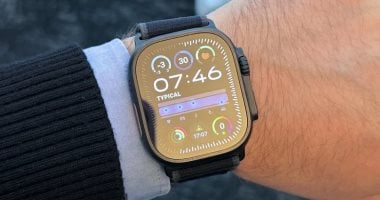
أطلقت شركة آبل النسخ التجريبية العامة الأولى (Public Betas) لأنظمة التشغيل المنتظرة watchOS 27 وtvOS 27، مما يتيح لمستخدمي ساعات "آبل ووتش" وأجهزة "آبل تي في" فرصة تجربة الميزات والترقيات الجديدة قبل إطلاقها الرسمي والنهائي للمستهلكين في خريف هذا العام.

ولم تقتصر التحديثات على الساعات والتلفزيون فقط، بل طرحت آبل أيضاً تحديثاً تجريبياً جديداً لنظام تشغيل سماعاتها الذكية تحت اسم HomePod Software 27 للإصدارين العادي والميني.

كيفية الاشتراك والتثبيت

يمكن للمستخدمين المهتمين بتجربة هذه الأنظمة التسجيل مجاناً في برنامج آبل لاختبار النسخ التجريبية العامة عبر موقعها الرسمي المخصص (Apple Beta Software Program)، ومن ثم تنزيل التحديثات مباشرة من خلال تطبيق الإعدادات على كل جهاز. وتتطابق النسخ التجريبية العامة المطروحة مع النسخة التجريبية الثالثة للمطورين (Developer Beta 3) التي صدرت الأسبوع الماضي.

تحديث ساعة آبل (watchOS 27): 

يأتي نظام تشغيل الساعة الجديد مدعوماً بميزات "Siri AI" المتطورة، حيث يمكنك استخدام المساعد الذكي مباشرة من معصمك طالما أن ساعتك متصلة بهاتف آيفون يدعم هذه التقنيات. وبفضل الذكاء الاصطناعي، تستطيع Siri الآن الوصول إلى معلوماتك الشخصية، والإجابة عن مختلف الأسئلة المعقدة، وإنجاز المهام المتنوعة بالنيابة عنك.

ويضم النظام ميزات أساسية أخرى تشمل تطبيق Siri مخصص: يظهر بشكل بارز في منتصف واجهة "شبكة التطبيقات الديناميكية" الجديدة التي تظهر عند الضغط على الزر التاجي الرقمي (Digital Crown)، وإيماءات واقتراحات ذكية، إيماءة جديدة لتحديد الوجوه والأدوات (Widgets) في "الحزمة الذكية" (Smart Stack)، بجانب اقتراحات ذكية مضافة للوصول السريع لبطاقات المواصلات، العثور على مكان سيارتك المركونة، وتنبيهات أعياد الميلاد.
كما تطوير ميزات اللياقة بدقة أعلى، حيث يعمل تطبيق "رفيق التمرين" (Workout Buddy) الآن بشكل مستقل تماماً دون الحاجة لوجود الآيفون في مكان قريب، مع تتبع أكثر دقة لمسافات الجري والمشي على أجهزة المشي الرياضية (Treadmills).

تلفزيون آبل (tvOS 27): تجربة ترفيهية أسرع وأكثر سلاسة

من جانبه، يقدم تحديث تلفزيون آبل tvOS 27 العديد من الترقيات التي تركز على تحسين الأداء العام والتجربة الترفيهية للمستخدم، وأبرزها إعادة تصميم تطبيق البودكاست (Podcasts)، وترقيات صوتية فائقة، بما في ذلك دعم الصوت عالي الدقة بدون فقدان الجودة (Hi-Res Lossless) وميزة الانتقال التلقائي والسلس بين الأغاني (AutoMix) في خدمة Apple Music.

وسهولة تبديل الحسابات لجعل الانتقال بين الملفات الشخصية المختلفة للمستخدمين على نفس الجهاز أكثر سهولة وسلاسة، وترقية الأداء العام والسرعة لتشغيل أسرع للتطبيقات، ورسوم متحركة (Animations) أكثر سلاسة ومرونة، بالإضافة إلى سرعة أكبر في ربط الأجهزة عند استخدام ميزة AirPlay لبث المحتوى.


watchOStvOSApple WatchApple TV
الخبر متوفّر باللغات التالية:English
المصدر الأصلي للخبر
اليوم السابع

How to Try Apple’s New WatchOS, HomePod, and TV Before Anyone Else

July 15, 2026·Youm7
How to Try Apple’s New WatchOS, HomePod, and TV Before Anyone Else

Apple has released the first public beta versions of its upcoming operating systems, watchOS 27 and tvOS 27. This allows users of Apple Watch and Apple TV to try out new features and upgrades before their official release to consumers this fall.

The updates are not limited to watches and television only; Apple has also released a new experimental update for the operating system of its smart speakers, HomePod Software 27, for both regular and mini versions.

How to Subscribe and Install

Users interested in trying out these systems can register for free on Apple’s official website dedicated to the Apple Beta Software Program. They can then download the updates directly through the settings app on each device. The public beta versions are compatible with Developer Beta 3, which was released last week.

Apple Watch Update (watchOS 27):

The new watch operating system comes with advanced “Siri AI” features. You can use the smart assistant directly from your wrist as long as your watch is connected to an iPhone that supports these technologies. Thanks to artificial intelligence, Siri can now access your personal information, answer complex questions, and perform various tasks on your behalf.

The system also includes other key features such as a customized Siri application: it is prominently displayed in the middle of the new "Dynamic App Grid" interface that appears when pressing the digital crown button, and smart gestures and suggestions. There is also a new gesture for identifying faces and tools (widgets) in the "Smart Stack," along with added smart suggestions for quick access to transit cards, finding your parked car, and birthday reminders.
Additionally, fitness features have been enhanced with higher precision. The "Workout Buddy" app now works completely independently without the need for an iPhone nearby, with more accurate tracking of running and walking distances on treadmills.

Apple TV (tvOS 27): A faster and smoother entertainment experience

The Apple TV tvOS 27 update introduces several enhancements that focus on improving overall performance and the user's entertainment experience. The most notable of these are the redesigned Podcasts app and advanced audio upgrades, including support for high-resolution lossless audio (Hi-Res Lossless) and the AutoMix feature in Apple Music, which automatically and smoothly transitions between songs.

There is also an easier way to switch accounts to make it simpler and smoother to move between different user profiles on the same device. Performance and speed have been upgraded for faster app launch times, smoother and more flexible animations, and quicker device pairing when using AirPlay to stream content.


watchOStvOSApple WatchApple TV
This article is also available in:العربية
Original source article
Youm7