لماذا تعتمد منصة "هوم فيو" من آبل على هاتفك الآيفون
13 نوفمبر 2026·إنجاجيت
لماذا تعتمد منصة "هوم فيو" من آبل على هاتفك الآيفون

كل شيء يعود إلى الراحة والشخصية دون التضحية بالخصوصية.

بقلم بيلي ستيل 13 نوفمبر، 2026 9:00 صباحًا بتوقيت شرق الولايات المتحدة بيلي ستيل لموقع Engadget أضف Engadget على جوجل: Google Discover

"لا يوجد منتج في العالم مصمم بشكل أفضل ليكون محورك الشخصي الذكي من هاتف iPhone."

هذا هو البيان الذي أدلى به جون تيرنوس، الرئيس التنفيذي الجديد لشركة Apple، خلال ملاحظاته الافتتاحية في أول حدث لهاتف iPhone هذا العام. لذلك، لا ينبغي أن يكون مفاجئًا أن الجهاز الذي يحتوي على الكثير من بياناتك سيلعب دورًا حيويًا مع "محور شخصي ذكي" منفصل يظل داخل منزلك.

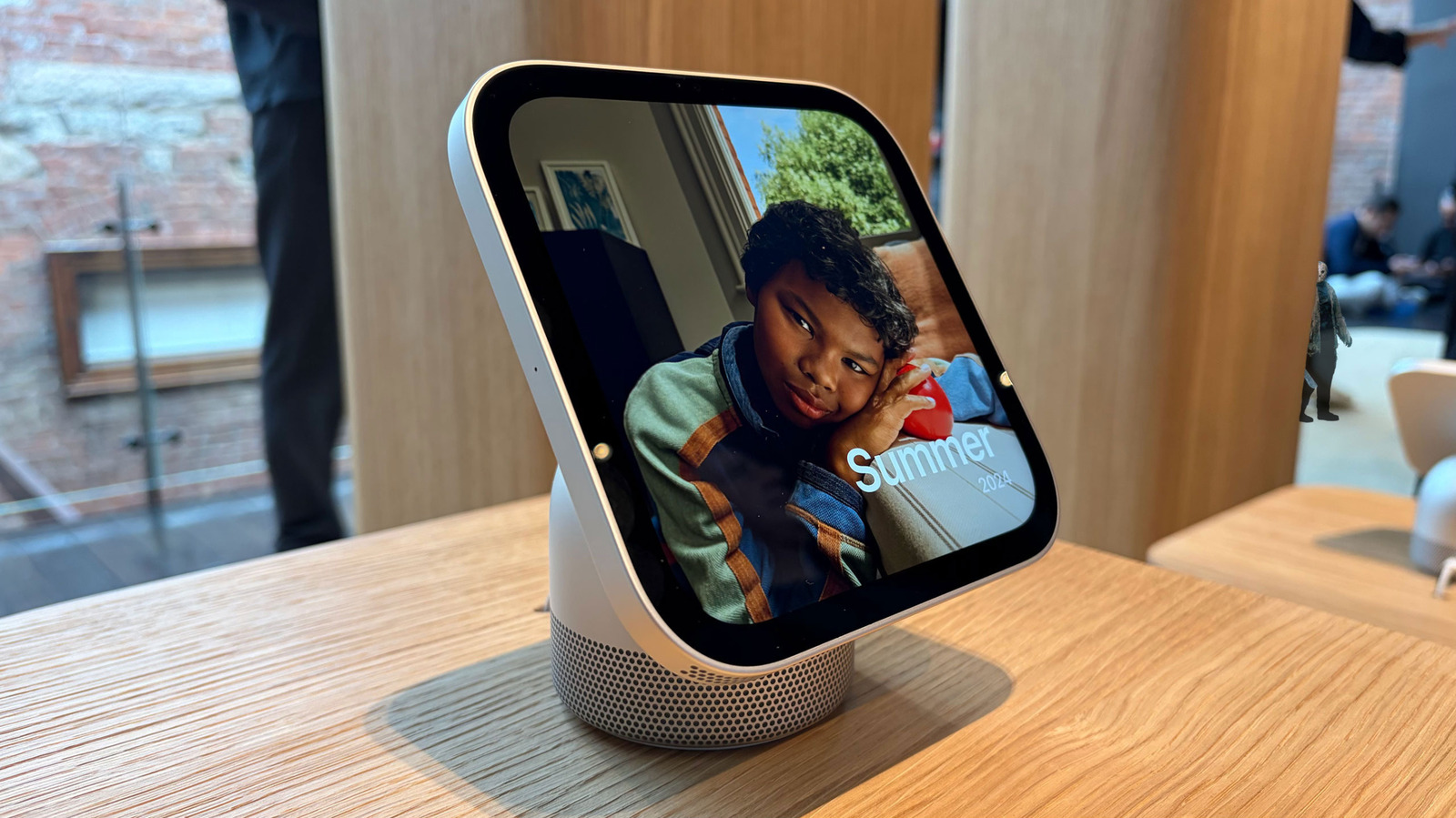
يشهد هذا الأسبوع وصول HomeView، الشاشة الذكية التي طال انتظارها من Apple والتي تم الإعلان عنها الشهر الماضي. كما أوضحت بالتفصيل في مراجعتي، فهو مزيج أساسي من العديد من الأجهزة في واحد. إنه واجهة بصرية ومكبر صوت ذكي يستمع دائمًا لاستفسارات Siri الخاصة بك. إنه محور منزل ذكي لمجموعة من الأجهزة المتصلة. إنه طاهٍ مساعد في المطبخ، ومحطة FaceTime عندما تحتاج إلى اللحاق بالأصدقاء والعائلة. بل هو حتى إطار صور رقمي.

لا تعمل منصة HomeView على تشغيل التطبيقات، ولكنها تؤدي جميع هذه الوظائف وغيرها عن طريق عرض التطبيقات المثبتة مسبقًا على هاتفك الآيفون أو الآيباد. بدلاً من السماح لك بتنزيل البرامج من متجر التطبيقات، يعمل نظام HomeView مثل CarPlay في سيارتك. فهو يعرض عليك التطبيقات المتوافقة التي قمت بتثبيتها مسبقًا على هاتفك المحمول أو جهازك اللوحي، بالإضافة إلى مجموعة أدوات Apple الأساسية، بما في ذلك التقويم والرسائل والتذكيرات والطقس.

بيلي ستيل للإنغاجيت

هذا أحد الأسباب التي تجعل الآيفون (أو الآيباد) يحتاج إلى أن يكون قريبًا من HomeView ليعمل.

"عندما نصمم منتجات المنزل، نضع دائمًا ثلاثة أشياء في الاعتبار"، أخبرتني سيسيليا دانطا، عضو فريق التسويق لمنتجات المنزل في شركة Apple. "يجب أن تكون ذكية وشخصية وخاصة."

نظرًا لأن Siri AI يحتاج إلى جميع تلك التطبيقات لتتمكن من توفير السياق الشخصي الذي يجعل إجاباتها أكثر ذكاءً وودية، كانت شركة آبل بحاجة إلى طريقة لمنحها هذا الوصول دون المساس بخصوصيتك. إن وجود هاتف iPhone كالحاوية الوحيدة لهذه المعلومات واشتراط وجوده بالقرب منك لكي تكون بياناتك متاحة يساعد على إبقائها آمنة من الأعين الفضولية عندما تغادر.

باعتباره مركزًا منزليًا عامًا أكثر، يجب أن يعمل HomeView لكل عضو في الأسرة حتى يتمكنوا من إطفاء الأضواء أو رؤية من هو عند الباب. لكن لا ينبغي أن يظهر لهم كل رسالة نصية تتلقاها من والديك أو يكشف عن دعواتك إلى التقويم ويدمر المفاجآت دون قصد. لهذا السبب، بالإضافة إلى التعرف على الوجه والصوت المدمج، يعتمد HomeView بشكل كبير على iPhone أو iPad.

"كل ما يشعر بالطبيعية على الهاتف متاح الآن في جهاز خفي يمكن الإطلاع عليه بلمحة يعطيك ما تحتاجه في اللحظة"، قال ماتيو كوستيلو، نائب رئيس هندسة الأجهزة. "إنه يتعرف عليك ويظهر لك معلوماتك، ولكن عندما تبتعد، فإنه يختفي."

Apple HomeView وآيفون يظهر تفاعلات الذكاء الاصطناعي سيري.

وأوضح كوستيلو كذلك أن HomeView يقدم أفضل مزيج من المعلومات الشخصية مع ميزة الأجهزة المجتمعية المخصصة. بما أن الآيفون هو مركز المستخدم لمحتواه الشخصي - وفي الواقع، حياته - كان من المنطقي "توسيع وتوصيل تلك الذكاء" في منتجات مثل HomeView.

إذا لم يتعرف HomeView على المستخدم، فلن يسمح له بأداء مهام أساسية. وحتى إذا كنت مستخدمًا معروفًا، ستحتاج إلى وجود الآيفون أو الآيباد الذي قمت بفك قفل شاشته مؤخرًا بالقرب من الشاشة الذكية لعرض أشياء مثل رسائلك أو تقويمك.

وأشار كوستيلو: "لا تظهر المعلومات الشخصية إلا بعد التعرف عليك بواسطة وجهك، [وإذا] كان الآيفون المرتبط بك موجودًا ومفكوك القفل مؤخرًا". "لقد فكرنا في بناء المعلومات السياقية والذكاء، ولكن أيضًا الخصوصية، وكانت هذه الأمور بالغة الأهمية وفريدة من نوعها للغاية."

من خلال ربط ما يظهر لك على شاشة "HomeView" بهاتفك، يتم عرض بياناتك أثناء تفاعلك مع الجهاز وتختفي معك عندما تغادره. كما أوضحت كوستيلو، لا يتم "نشرها أو تخزينها على الجهاز بأي شكل من الأشكال".

يعود الاعتماد الكبير على الآيفون أو الآيباد بمزايا إضافية. مثل السماح لك بنقل الموسيقى، مكالمات فيس تايم وغيرها كما هو الحال مع "HomePod". إحدى أفضل ميزات الجهاز هي دمج الوصفات في سفاري مما يسهل عملية الطهي. تعمل هذه الميزة أيضًا من خلال إجراء النقل، لذا ستحتاج إلى جهاز أبل آخر لبدء العملية. لكن دانطا أوضحت أن شركة أبل لا ترى الاعتماد على الهاتف المحمول أو الجهاز اللوحي عائقًا.

Apple HomeView على طاولة المطبخ.بيلي ستيل للإنجادجت

"لا يتعلق الأمر فقط بالاعتماد، بل هو جزء من هذا النظام البيئي"، كما قالت. لا تتيح شاشة "HomeView" تشغيل التطبيقات المألوفة فحسب، بل أيضًا طريقة التفاعل المألوفة.

بالحديث عن التفاعل، هناك سبب لعدم وجود أي أزرار على HomeView. لقد بنتها آبل بهذه الطريقة عمدًا. وجدت ذلك غريبًا، بالنظر إلى أن الجهاز عبارة عن مزيج من الآيباد (شاشة لمس)، وساعة آبل (شكل مربع) و HomePod (مكبر صوت)، اثنان منها لديهما أزرار مادية. لكن كوستيلو قال إن الإدخال باللمس كان دائمًا ثانويًا.

"لطالما تصورنا أنه شيء يعتمد على الصوت أولاً، ثم اللمس ثانيًا"، كما أوضح. "عند تصميم المنتج، فكررنا بهذه الطريقة، وبالتالي تم استبعاد الأزرار والتحكمات المادية."

بالنسبة لدانتس، كانت إحدى التحديات الرئيسية خلال مرحلة تطوير المنتج هي ضبط النفس. كان من الواضح أن عملية إحياء منتج وبرنامج جديدين مهمة شاقة، لكن فريق الهندسة كان عليه أيضًا تحديد أجزاء الأجهزة والخدمات الموجودة في آبل والتي يجب تضمينها وتلك التي يجب تركها.

"لقد كان لدينا منتجات منزلية منذ فترة، وبنينا عليها"، كما قالت. "أعتقد أنه كان تحديًا حقيقيًا للغاية أن نمرر ونقرر ما الذي سنقدمه وما الذي لن نقدمه [على HomeView]. كان ذلك مقصودًا لتقديم هذه التجربة القوية والبسيطة."

AppleHomeViewiPhone
الخبر متوفّر باللغات التالية:English
المصدر الأصلي للخبر
إنجاجيت

Why Apple's HomeView relies so heavily on your iPhone

November 13, 2026·Engadget
Why Apple's HomeView relies so heavily on your iPhone

It all comes down to convenience and personalization without sacrificing privacy.

By Billy Steele Nov. 13, 2026 9:00 am EST Billy Steele for Engadget Add Engadget on Google: Google Discover

"There's no product in the world better designed to be your intelligent personal hub than iPhone."

That's the statement newly minted Apple CEO John Ternus made during his opening remarks at his first iPhone event this year. It should be no surprise then, that the device holding so much of your data would play a vital role with a separate "intelligent personal hub" that stays inside your home.

This week marks the arrival of the HomeView, Apple's long-rumored smart display that was announced last month. As I explained in detail in my review, it's basically a combination of several gadgets in one. It's both a visual interface and a smart speaker that is always listening for your Siri queries. It's a smart home hub for a range of connected devices. It's a sous chef in the kitchen, and it's a FaceTime station when you need to catch up with friends and family. Heck, it's even a digital photo frame.

The HomeView doesn't run apps though. It performs all those functions, and more, by mirroring the apps that you have on your iPhone or iPad. Instead of allowing you to download software from the App Store, the HomeView's system works like CarPlay does in your car. It shows you the compatible apps you've already installed on your phone or tablet, as well as Apple's core suite, including Calendar, Messages, Reminders and Weather.

Billy Steele for Engadget

This is just one of the reasons an iPhone (or iPad) needs to be close by for the HomeView to work.

"When we design home products, we always keep three things in mind," Cecilia Dantas, a member of Apple's Home product marketing team, told me. "They have to be intelligent, personal and private."

Since Siri AI needs all those apps to be able to provide the very personal context that makes its answers more intelligent and conversational, Apple needed a way to grant it that access that didn't compromise your privacy. Having your iPhone be the only container for that information and requiring it to be around for your data to be accessible helps keep it safe from prying eyes when you're away.

As a more general home hub, the HomeView has to work for every member of your household so they can turn lights off or see who's at the door. But it shouldn't be showing them every text message you get from your parents or revealing your calendar invites and inadvertently ruining surprises. This privacy is why, in addition to the built-in face and voice recognition, the HomeView relies so heavily on an iPhone or iPad.

"Everything that feels natural on a phone is now available in a subtle, glanceable device that gives you what you need in the moment," VP of hardware engineering Matthew Costello said. "It recognizes you and shows you your information, but when you step away, it's gone."

Apple HomeView and an iPhone showing Siri AI interactions.

Costello further explained that the HomeView offers the best combination of personal information with the convenience of a dedicated communal device. Since the iPhone is a user's hub for their personal content — and really, their life — it only made sense to "extend and link that intelligence" into products like the HomeView.

If the HomeView doesn't recognize a user, it will only allow them to perform basic tasks. And even if you are a recognized user, you'll need to have your recently unlocked iPhone or iPad nearby for the smart display to show things like your Messages or Calendar.

"Personal information only surfaces once you've been recognized by your face, and [if] your paired iPhone is present and recently unlocked," Costello noted. "We thought building on the contextual information and the intelligence, but also the privacy, was super critical and also very unique."

By tying what shows up for you on the HomeView to your phone, your data is displayed while you're interacting with the device and disappears with you when you do. As Costello explained, it's not "posted on or housed on the device in any way."

The heavy reliance on an iPhone or an iPad has additional benefits. Like you can on a HomePod, the HomeView allows you to hand off music, FaceTime calls and more. One of the device's best features is recipe integration in Safari that makes cooking easier. It's also powered by the hand off action, so you need that other Apple device to kickstart the process. But Dantas explained that Apple doesn't see reliance on your phone or tablet as a hindrance.

Apple HomeView on a kitchen counter.Billy Steele for Engadget

"It's not just dependency, it's also part of this ecosystem," she said. The HomeView's similarity to your phone doesn't just enable familiar apps, but also a familiar method of interaction.

Speaking of interaction, there's a reason why there aren't any buttons on the HomeView. Apple intentionally built it like this. I found it odd, considering the device is a bit of a hybrid of an iPad (touchscreen), an Apple Watch (square shape) and a HomePod (speaker), two of which have physical buttons. But Costello said touch input was always meant to be secondary.

"We always envisioned it as something that was voice first, then touch second," he explained. "As we [designed] the product, that's how we thought about it, so that eliminated buttons and physical controls."

For Dantas, one of the main challenges during the product development phase was restraint. The process of bringing a new product and new software to life was obviously a tall task, but the engineering team also had to determine which parts of Apple's existing devices and services to include and which ones to leave behind.

"We've had home products for a while, and we built on that foundation," she said. "I think it was really, really challenging to go through and decide what do we bring and what do we not bring [to the HomeView]. That was very intentional to deliver this experience that's powerful and that's simple."

AppleHomeViewiPhone
This article is also available in:العربية
Original source article
Engadget