كيفية إلغاء اشتراك شات جي بي تي (ولماذا قد ترغب في ذلك)
24 أغسطس 2026·إنجاجيت
كيفية إلغاء اشتراك شات جي بي تي (ولماذا قد ترغب في ذلك)

إذا أردت إلغاء اشتراكك، ستحتاج إلى استخدام نفس نظام الدفع الذي استخدمته للتسجيل.

بقلم نوفاك بوزوفيتش في 24 آب/أغسطس 2026 1:30 مساءً بتوقيت شرق الولايات المتحدة DC Studio/Shutterstock

لا يستغرق إلغاء اشتراك ChatGPT سوى بضع نقرات. ولكن إذا كان هدفك هو التخلي عن ChatGPT تمامًا، فقد يكون إيقاف الرسوم المتكررة مجرد جزء واحد فقط من العملية. قد ترغب أيضًا في حذف حسابك، أو منع المحادثات الجديدة من دخول عملية تدريب النموذج، أو ببساطة التوقف عن دفع مقابل الميزات التي لم تعد تستخدمها. يتعامل إلغاء الاشتراك مع الفوترة فقط، لذا فإن الخطوة التالية الصحيحة تعتمد على ما تريد إيقافه بالفعل.

أسباب إعادة النظر في خطة ChatGPT المدفوعة

تكون الخطة المدفوعة منطقية عندما تواجه حدود الطبقة المجانية بانتظام أو تعتمد على الأدوات المخصصة للطبقات الأعلى. إذا لم يعد هذا صحيحًا، يصبح تبرير دفع مبلغ شهري أمرًا صعبًا. أحد الخيارات هو ChatGPT Go، وهو طبقة مدفوعة أقل تكلفة تقدمها OpenAI الآن في كل بلد يدعم ChatGPT. لا يتطلب إنفاق مبلغ أقل بالضرورة التخلي عن الخطة المدفوعة تمامًا.

تضم اشتراكات الذكاء الاصطناعي طيّة غير معتادة أخرى: يمكن أن يتغير المنتج أثناء دفع ثمنه. أوقفت شركة OpenAI خدمة GPT-4o من شات جي بي تي في 13 فبراير/شباط 2026، بعد أن أعادتها سابقًا عندما قال بعض مستخدمي الإصدارات المميزة والمحترفة إنهم يفضلون أسلوبها الحواري. بالنسبة لمن اشترك جزئيًا للحصول على نموذج معين، فإن ذلك بمثابة تذكير بأن خدمة الذكاء الاصطناعي المدفوعة يمكن أن تتغير بشكل كبير من شهر إلى آخر.

لا تقتصر الأسباب التي قد تجعل شخصًا ما يعيد النظر في خطة شات جي بي تي المدفوعة على الميزات والسعر فقط. بعد اتفاقية شركة OpenAI في فبراير/شباط 2026 مع وزارة الدفاع الأمريكية لنشر نماذجها على شبكة الوزارة السرية، أظهرت بيانات سنسور تاور التي نشرتها تيك كرونش ارتفاعًا بنسبة 295٪ في إلغاء تثبيت تطبيق شات جي بي تي الأمريكي من يوم لآخر. عدلت شركة OpenAI الاتفاقية لاحقًا لحظر المراقبة المحلية للأشخاص الأمريكيين بشكل صريح، وقالت إن خدماتها لن تستخدمها وكالات الاستخبارات التابعة لوزارة الدفاع مثل وكالة الأمن القومي دون اتفاقية جديدة. ومع ذلك، فإن رقم سنسور تاور يقيس عمليات إلغاء التثبيت من التطبيق، وليس عمليات إلغاء الاشتراك المدفوعة.

كيفية إلغاء اشتراك ChatGPT
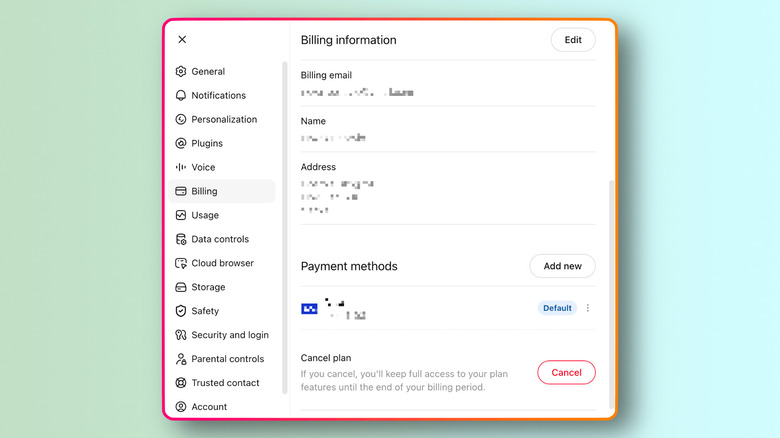
إعدادات الفوترة الخاصة بـ ChatGPT تعرض معلومات الفوترة، طريقة دفع محفوظة وخيار إلغاء خطة مدفوعة. نوفاك بوزوفيتش لموقع Engadget

لإلغاء اشتراك شخصي تم شراؤه على chatgpt.com، قم بتسجيل الدخول، وحدد أيقونة ملفك الشخصي، ثم افتح الإعدادات، واختر الفوترة وحدد إلغاء تحت إلغاء الخطة. توصي شركة OpenAI بالإلغاء قبل 24 ساعة على الأقل من تاريخ الفوترة التالي لتجنب فرض رسوم أخرى.

إذا اشتركت من خلال آبل، افتح تطبيق الإعدادات على الآيفون، انقر على اسمك، ثم انقر على الاشتراكات، واختر شات جي بي تي وانقر على إلغاء الاشتراك. أما على أندرويد، افتح متجر جوجل، وتأكد من تسجيل الدخول باستخدام حساب جوجل المستخدم في الشراء، ثم انتقل إلى الاشتراكات > شات جي بي تي وانقر على إلغاء الاشتراك. لا يؤدي حذف التطبيق إلى إلغاء اشتراك متجر التطبيقات أو متجر جوجل.

إذا لم تجد خيار الإلغاء، تحقق أولاً من مكان اشتراكك في الأصل. تُدار الاشتراكات عبر الويب وآبل وجوجل بشكل منفصل، وتحذر شركة أوبن إيه آي من أنه من الممكن أن تنتهي إلى أكثر من اشتراك نشط عبر هذه المنصات. إذا فقدت الوصول إلى حساب شات جي بي تي أو عنوان بريده الإلكتروني، يمكن لفريق دعم أوبن إيه آي أيضًا إلغاء الاشتراك بعد تحديد الحساب باستخدام عنوان البريد الإلكتروني، والأرقام الأربعة الأخيرة لبطاقة الدفع وتاريخ آخر عملية دفع.

ما الذي يغيره و لا يغيره إلغاء اشتراك شات جي بي تي
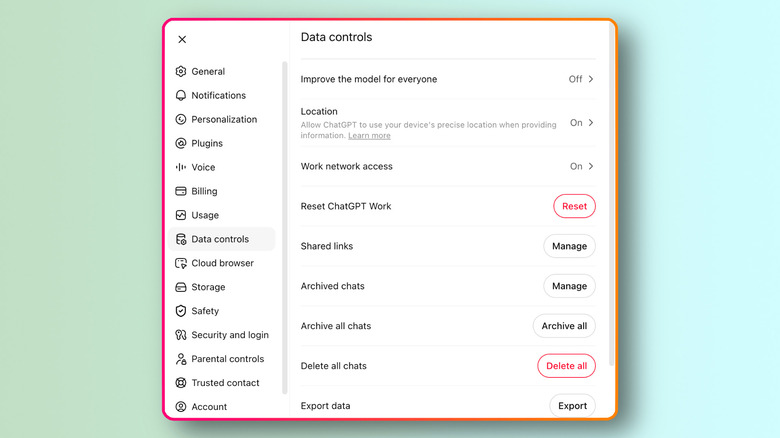
إعدادات تحكم بيانات شات جي بي تي تظهر خيار نوفاك بوزوفيتش لإنغاجيت

يؤدي إلغاء الاشتراك إلى منع عمليات التجديد المستقبلية، لكنه لا يحذف حسابك على أوبن إيه آي أو يمحو المحادثات الموجودة. تظل الدردشات القياسية محفوظة في حسابك حتى تحذفها، لذا فإن إلغاء خطة مدفوعة ليس نفس الأمر كحذف بياناتك.

يتم التحكم بشكل منفصل في ما إذا كانت محادثاتك تُستخدم لتدريب النموذج. من خلال إيقاف تحسين النموذج للجميع تحت الإعدادات > ضوابط البيانات، يتم منع استخدام المحادثات الجديدة لتحسين نماذج OpenAI مع الحفاظ على تلك المحادثات في تاريخك. تُعد الدردشات المؤقتة خيارًا آخر للمحادثات الفردية: فهي لا تظهر في التاريخ أو تُستخدم لتحسين النماذج، وتقول OpenAI إنها قد تحتفظ بنسخة منها لمدة تصل إلى 30 يومًا لأغراض السلامة.

يتم حذف حسابك على OpenAI بشكل منفصل عن إلغاء الاشتراك. يُعد حذف الحساب دائمًا، ويمنع الوصول إلى خدمات OpenAI ويؤدي إلى حذف بيانات الحساب خلال 30 يومًا، باستثناء معلومات محدودة قد تحتفظ بها OpenAI حيثما كان ذلك مطلوبًا أو مسموحًا به بموجب القانون. إذا كانت Apple أو Google تُحصّل منك المال، فقم بإلغاء الاشتراك عبر متجر التطبيقات ذي الصلة قبل حذف الحساب.

ماذا يحدث بعد إلغاء شات جي بي تي
لقطة مقربة لهاتف ذكي يعرض شات جي بي تي في واجهة بحث أثناء الاستقرار على لوحة مفاتيح الكمبيوتر. PixieMe/Shutterstock

لا يزيل الإلغاء الميزات المدفوعة على الفور. تقول شركة أوبن إيه آي أن الإلغاء يصبح ساري المفعول في اليوم التالي لتاريخ الفوترة التالي، لذا يمكنك الاستمرار في استخدام الخطة المدفوعة خلال فترة الفوترة الحالية.

كما لا يؤدي الإلغاء تلقائيًا إلى استرداد المبلغ. إذا قمت بالاشتراك عبر chatgpt.com أو Google Play، فيمكنك طلب استرداد من خلال مركز مساعدة OpenAI. يجب طلب استردادات App Store مباشرة من Apple. بالنسبة لعمليات الشراء من chatgpt.com و Google Play، تكون المشتريات العرضية مؤهلة عادةً للاسترداد إذا تواصلت مع OpenAI خلال 14 يومًا من التحصيل.

عملاء الاتحاد الأوروبي، والمملكة المتحدة، وتركيا مؤهلون أيضًا للحصول على استرداد تناسبي إذا قاموا بالإلغاء خلال 14 يومًا من الشراء.

بمجرد انتهاء فترة الدفع، يظل حسابك متاحًا إلى جانب أي محادثات لم تقم بحذفها. يؤدي إلغاء الاشتراك إلى إيقاف عملية الدفع المتكررة دون الحاجة إلى اتخاذ قرار بشأن الاستمرار في استخدام ChatGPT.

ChatGPTsubscriptioncancellation
الخبر متوفّر باللغات التالية:English
المصدر الأصلي للخبر
إنجاجيت

How to cancel your ChatGPT subscription (and why you might want to)

August 24, 2026·Engadget
How to cancel your ChatGPT subscription (and why you might want to)

If you want to cancel your subscription, you'll need to go through the same payment system you used to sign up.

By Novak Božović Aug. 24, 2026 1:30 pm EST DC Studio/Shutterstock

Canceling a ChatGPT subscription only takes a few clicks. But if your goal is to quit ChatGPT entirely, stopping the recurring charge may be only one part of it. You might also want to delete your account, keep new chats out of model training or simply stop paying for features you no longer use. Canceling the subscription handles only the billing, so the right next step depends on what you actually want to stop.

Reasons to reconsider a paid ChatGPT plan

A paid plan makes the most sense when you regularly run into the Free tier's limits or rely on tools reserved for higher tiers. If that's no longer true, paying every month gets harder to justify. One option is ChatGPT Go, a lower-cost paid tier that OpenAI now offers in every country where ChatGPT is supported. Spending less doesn't necessarily require giving up a paid plan altogether.

AI subscriptions have another unusual wrinkle: the product can change while you are paying for it. OpenAI retired GPT-4o from ChatGPT on February 13, 2026, after previously restoring it when some Plus and Pro users said they preferred its conversational style. For someone who subscribed partly for access to a particular model, that's a reminder that a paid AI service can change substantially from one month to the next.

Features and price aren't the only reasons someone might reconsider a paid ChatGPT plan. After OpenAI's February 2026 agreement with the US Department of Defense to deploy its models on the department's classified network, Sensor Tower data reported by TechCrunch showed US ChatGPT app uninstalls jumping 295 percent day over day. OpenAI later amended the agreement to explicitly prohibit domestic surveillance of US persons and said its services would not be used by Defense Department intelligence agencies such as the NSA without a new agreement. The Sensor Tower figure measures app uninstalls, though, not paid subscription cancellations.

How to cancel your ChatGPT subscription

ChatGPT's Billing settings showing billing information, a saved payment method and the option to cancel a paid plan. Novak Bozovic for Engadget

For a personal subscription purchased on chatgpt.com, log in, select your profile icon, open Settings, choose Billing and select Cancel under Cancel plan. OpenAI recommends canceling at least 24 hours before the next billing date to avoid another charge.

If you subscribed through Apple, open the iPhone Settings app, tap your name, tap Subscriptions, select ChatGPT and tap Cancel Subscription. On Android, open Google Play, make sure you're signed in with the Google account used for the purchase, then go to Subscriptions > ChatGPT and tap Cancel subscription. Uninstalling the app does not cancel an App Store or Google Play subscription.

If you can't find the cancel option, first check where you originally subscribed. Web, Apple and Google subscriptions are managed separately, and OpenAI warns that it's possible to end up with more than one active subscription across those platforms. If you have lost access to the ChatGPT account or its email address, OpenAI support can also cancel the subscription after locating the account using the email address, the last four digits of the payment card and the date of the most recent payment.

What canceling a ChatGPT subscription does and doesn't change

ChatGPT's Data Controls settings showing the "Improve the model for everyone" option turned off, along with chat management and data export controls. Novak Bozovic for Engadget

Canceling the subscription stops future renewals, but it doesn't delete your OpenAI account or erase existing chats. Standard chats remain saved to your account until you delete them, so canceling a paid plan is not the same thing as removing your data.

Whether your chats are used for model training is controlled separately. Under Settings > Data Controls, turning off Improve the model for everyone prevents new conversations from being used to improve OpenAI's models while leaving those conversations in your history. Temporary Chats are another option for individual conversations: they don't appear in history or get used to improve the models, and OpenAI says it may keep a copy for up to 30 days for safety purposes.

Deleting your OpenAI account is separate from canceling the subscription. Account deletion is permanent, prevents access to OpenAI services and triggers deletion of account data within 30 days, apart from limited information OpenAI may retain where required or permitted by law. If Apple or Google is billing you, cancel the subscription through the relevant app store before deleting the account.

What happens after you cancel ChatGPT

Close-up of a smartphone displaying ChatGPT in a search interface while resting on a computer keyboard. PixieMe/Shutterstock

Canceling doesn't remove paid features immediately. OpenAI says the cancellation becomes effective the day after the next billing date, so you can keep using the paid plan through the current billing period.

Canceling also doesn't automatically result in a refund. If you subscribed through chatgpt.com or Google Play, you can request one through OpenAI's Help Center. App Store refunds must be requested directly from Apple. For chatgpt.com and Google Play purchases, accidental purchases are generally eligible for a refund if you contact OpenAI within 14 days of the charge.

Customers in the EU, UKand Turkey are also eligible for a prorated refund if they cancel within 14 days of purchase.

Once the paid period ends, your account remains available along with any chats you haven't deleted. Canceling the subscription stops the recurring payment without requiring you to decide whether to keep using ChatGPT.

ChatGPTsubscriptioncancellation
This article is also available in:العربية
Original source article
Engadget