ما هو أفضل نوع لحالة الهاتف للشحن اللاسلكي؟
7 أغسطس 2026·إنجاجيت
ما هو أفضل نوع لحالة الهاتف للشحن اللاسلكي؟

إذا كان شاحنك اللاسلكي بطيئًا، فقد يكون المشكلة في غطائك.

بقلم ماكس ميلر 7 أغسطس 2026 9:30 ص EST هادريان/شاترستوك

الشحن اللاسلكي أصبح منتشرا هذه الأيام، لكنه استغرق بعض الوقت ليصبح شائعًا. تم تقديم الميزة في الأصل عام 2009 على جهاز Palm Pre (إحدى العديد من الميزات التي ساعدت الجهاز ليكون كنزًا ثمينًا لعشاق الهواتف الذكية حتى يومنا هذا). ومن المفارقات أن Pre استخدم حامل شحن مغناطيسي لمواءمة ملفات الشحن اللاسلكي، وهي فكرة ستترك جانبًا لمدة 11 عامًا قبل أن تنتشر على نطاق واسع عندما قدمت آبل تقنية MagSafe للشحن في iPhone 12.

في السنوات بين هذين الهاتفين الأسطوريين، كان الشحن اللاسلكي أكثر تخصصًا. أدرجته شركة نوكيا في جهاز Lumia 920، وكان هذا الجهاز لعام 2012 أول هاتف يستخدم معيار Qi التابع لاتحاد الطاقة اللاسلكية، والذي لا يزال المعيار الفعلي للشحن اللاسلكي حتى اليوم. وقد تبعه بسرعة سامسونج جالاكسي S3، الذي يمكن تركيبه كإكسسوار شحن لاسلكي منفصل. لكن هاتف Google Nexus 4، الذي تصنعه شركة إل جي، كان أول هاتف أندرويد يأتي بشاحن Qi خارج الصندوق. وفي عام 2017، أصبح iPhone 8 أول هواتف الشركة الذكية التي تدعم الشحن اللاسلكي، مما أعطى التكنولوجيا دفعة قوية.

لكن طوال الوقت الذي استخدمنا فيه الشحن اللاسلكي، كنا أيضًا نضع هواتفنا في أغلفة ذات جودة متفاوتة. ولا يأخذ جميع مصنعي الأغلفة في الاعتبار عملية الشحن اللاسلكي في تصاميمهم. ويمكن غالبًا إرجاع العديد من المشكلات الأكثر شيوعًا التي يواجهها الأشخاص مع الشحن اللاسلكي، بدءًا من الاتصالات غير المتسقة إلى سرعات الشحن البطيئة للغاية، إلى غلاف لا يعمل بشكل جيد. وبطبيعة الحال، تعد الأغلفة مهمة حيث تستمر أسعار الهواتف في الارتفاع ويصبح استبدالها مكلفًا، ولا تحتاج إلى ترك هاتفك مكشوفًا حتى تحصد فوائد الشحن اللاسلكي. إليك كيفية اختيار غلاف يُسهل عملية الشحن بالتحريض.

تجنب الحالات التي لا تعمل بشكل جيد مع الشحن اللاسلكي
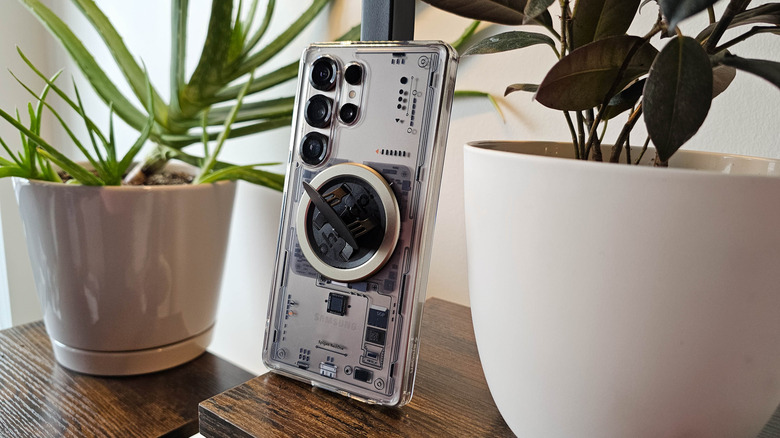
مثال رائع على ما يجب تجنبه في الشحن اللاسلكي: سامسونج جالاكسي إس 25 الترا مع غطاء سبيجين و Ohsnap Snap Grip مثبتة. ماكس ميلر لموقع Engadget

الشحن اللاسلكي هو تقنية مليئة بالتحديات التي لم يتم التغلب عليها بعد. بالنسبة لبعض المستخدمين، تفوق مزايا الشحن اللاسلكي هذه المشكلات، ولكن فهمها يمكن أن يساعدك على الحصول على أقصى استفادة من تجربة شحن Qi (كي). الشحن اللاسلكي غير فعال ويتسرب منه الطاقة، حيث لا يتم نقل الطاقة من المعدن إلى المعدن بل تمر عبر لوحة ظهر الهاتف وغلاف الشاحن، مما يخلق بدوره الكثير من الحرارة الزائدة. وهذا يعني أيضًا أن الشحن اللاسلكي أبطأ من الشحن السلكي. في حين أن بعض الهواتف الذكية تشحن بسرعة 80 واط أو أكثر باستخدام شاحنات خاصة بها، فإن أعلى سرعة شحن لاسلكي حاليًا هي 25 واط،حتى أن ذلك ممكن فقط مع حلقة مغناطيسية Qi2 أو MagSafe لمواءمة ملفات الشحن بشكل أكثر دقة مع لوحة الشحن.

يمكن أن تؤدي الحالة الخاطئة إلى تفاقم هذه المشكلات. إذا كانت الحالة سميكة للغاية، فستجد الطاقة صعوبة أكبر في الانتقال من اللوحة إلى الجهاز، وستحتجز الحرارة بواسطة المادة الأكثر سماكة. إذا استخدمت الحالة المعدن في المكان الخطأ، فقد تمنع عملية الشحن اللاسلكي تمامًا. ينطبق نفس الأمر على المغناطيسات الموضوعة بشكل غير صحيح (ما لم نتحدث عن مغناطيسات Qi2/MagSafe؛ المزيد حولها أدناه).

يمكن أن تسبب PopSockets وملحقات ظهر الهاتف الأخرى مشكلات مماثلة، حيث أنها تضيف مادة يمكن أن تعيق عملية الشحن اللاسلكي. حتى لو ادعت الملحقة دعمها للشحن اللاسلكي، كن حذرًا. لقد كنت من المعجبين الكبيرين بـ OhSnap! Snap Grip. للأسف، لا تلتصق هذه المقابض بشكل صحيح بظهر هواتف سامسونج الأحدث، مما يعني أنني اضطررت إلى تثبيت خاصتي فوق حالة. على الرغم من أنني تمكنت من شحن هاتفي لاسلكيًا على الرغم من الحجم الإضافي، إلا أنني في النهاية تمكنت من طهي الهاتف بما يكفي لتخفيف اللاصق الذي يثبت لوحة الظهر في مكانها. نتيجة لذلك، من المحتمل أن جهاز Galaxy S25 Ultra الخاص بي لم يعد مقاومًا للماء.

اختر غطاءًا مناسبًا للشحن اللاسلكي
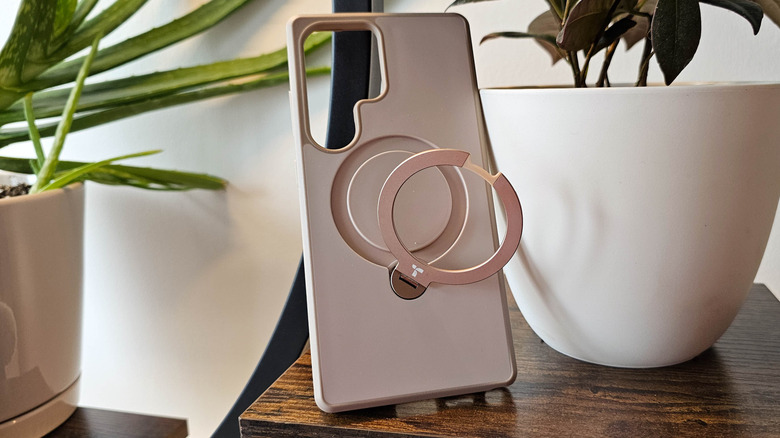
غطاء حلقة Torras لجهاز Samsung Galaxy S25 Ultra. بقلم ماكس ميلر لمجلة Engadget

بمجرد استبعاد الغطاءات التي تحتوي على خيارات تصميمية تحد من الشحن اللاسلكي، يمكنك التركيز على أفضل غطاءات الهواتف الآيفون والأندرويد التي تسهل هذه العملية بشكل أكبر. كما هو واضح على الأرجح، ستحتاج إلى غطاء يحتوي على حلقة شحن مغناطيسية Qi2 إذا كنت ترغب في استخدام هاتفك مع أجهزة الشحن MagSafe و Qi2. ومع ذلك، لا تفترض أن الغطاء سيعمل بشكل جيد مع أجهزة الشحن Qi2 لمجرد أنه يحتوي على حلقة مغناطيسية. يمتلك أحد الغطاءات التي أملكها حلقة مغناطيسية يمكن إخراجها لتصبح قبضة مريحة وحامل، لكن المفصل أصبح أقل صلابة بمرور الوقت. وفي النهاية، أدى ربطه بشاحن السيارة Qi2 إلى انفصال الحلقة عن إطار الغطاء أثناء القيادة، مما أدى إلى كسر الاتصال.

مرة أخرى، كلما قل المواد الموجودة في الطريق، كان ذلك أفضل. لقد حققت نتائج رائعة مع حالات مثل Spigen MagFit، التي تحتوي على طبقة رقيقة من البلاستيك TPU على جانبها الخلفي، و Speck Presidio 2، التي تحتوي على فتحة دائرية على الجانب الداخلي للتخلص من طبقة كاملة من البلاستيك حول ملفات الشحن في الهاتف. من المهم بشكل خاص العثور على غطاء رقيق إذا كنت ترغب في استخدام ملحقات Qi2 و MagSafe مع هاتف مثل Samsung Galaxy S26 Ultra الذي لا يحتوي على مغناطيس مدمج، حيث أن الغطاء هو الطريقة الوحيدة لتمكين هذه الوظيفة (ما لم تكن ترغب في وضع حلقة مغناطيسية لاصقة مباشرةً على ظهر الهاتف، مما يمنعك من استخدام الغطاء بالكامل).

النصيحة الأفضل، خاصة إذا كنت تسوق عبر الإنترنت، هي تصفح مراجعات العملاء لحالة معينة والبحث عن مقاطع فيديو على يوتيوب تناقش توافق الحالة مع الشواحن اللاسلكية. ما قد يبدو وكأنه يحقق جميع الصناديق ذات الصلة في قائمة المنتج قد لا يتحمل الاستخدام الفعلي.

phone_casewireless_chargingQi
الخبر متوفّر باللغات التالية:English
المصدر الأصلي للخبر
إنجاجيت

What type of phone case is best for wireless charging?

August 07, 2026·Engadget
What type of phone case is best for wireless charging?

If your wireless charger is slow, the problem might be your case.

By Max Miller Aug. 7, 2026 9:30 am EST Hadrian/Shutterstock

Wireless charging is all the rage these days, but it took a while to become mainstream. The feature was originally introduced in 2009 on the Palm Pre (one of many features that helped the device become a holy grail for smartphone nerds to this very day). Ironically, the Pre used a magnetic charging stand to align its wireless charging coils, an idea that would fall by the wayside for 11 years before surging to widespread popularity when Apple introduced MagSafe charging on the iPhone 12.

In the years between those two iconic smartphones, wireless charging was more niche. Nokia included it on the Lumia 920, and that 2012 device was the first phone to use the Wireless Power Consortium's Qi standard, which remains the de facto standard for wireless charging even today. It was quickly followed by the Samsung Galaxy S3, which could be retrofitted with a sold-separately wireless charging accessory. But the Google Nexus 4, manufactured by LG, was the first Android phone to come with Qi charging out of the box. In 2017, the iPhone 8 became the first of the company's smartphones to support wireless charging, giving the tech a shot in the arm.

But for the entire time we've had wireless charging, we've also been shoving our phones into cases of varying quality. And not all case manufacturers factor wireless charging into their designs. Many of the most common issues people have with wireless charging, from inconsistent connections to frustratingly slow charging speeds, can often be chalked up to a case that's not playing nice. Of course, cases are important as phone prices continue to increase and replacements become unaffordable, and you don't need to leave your phone naked in order to reap the benefits of wireless charging. Here's how to pick a case that's conducive to induction charging.

Avoid cases that don't play nice with wireless power

A great example of what not to do for wireless charging: Samsung Galaxy S25 Ultra with Spigen case and Ohsnap Snap Grip installed. Max Miller for Engadget

Wireless charging is a technology riddled with challenges that have yet to be overcome. The convenience of wireless charging outweighs these issues for some users, but understanding them can help you get the most out of your Qi charging experience. Wireless charging is inefficient and leaks energy, since the power isn't transferring metal-to-metal but is instead passing through your phone's backplate and the casing of the charger, which in turn creates a lot of excess heat. That also means wireless charging is slower than wired charging. Whereas some smartphones charge at 80W or more with proprietary chargers, the top wireless charging speed is currently 25W, and even that is only possible with a Qi2 or MagSafe magnetic ring to align the charging coils more precisely with the charging pad.

The wrong kind of case can compound those issues. If a case is too thick, energy will have an even harder time getting from the pad to the device, and the heat will get trapped by the thicker material. If the case uses metal in the wrong place, it can prevent wireless charging entirely. Ditto for improperly placed magnets (unless we're talking about Qi2/MagSafe magnets; more on those below).

PopSockets and other phone-back accessories can introduce similar issues, since they add material that can hamper wireless charging. Even if an accessory claims to support wireless charging, be careful. I've been a big fan of the OhSnap! Snap Grip. Unfortunately, those grips don't stick properly to the back of newer Samsung phones, which means I've had to install mine on top of a case. While I did have some luck wirelessly charging my phone despite the added bulk, I eventually managed to cook the phone enough to loosen the adhesive holding the backplate in place. As a result, my Galaxy S25 Ultra is most likely no longer water-resistant.

Pick an induction-friendly case

Torras ring case for Samsung Galaxy S25 Ultra. Max Miller for Engadget

Once you've ruled out cases with design choices that limit wireless charging, you can focus on the best cases for iPhone and Android that more actively facilitate it. As is likely obvious, you'll need a case with a Qi2 magnetic charging ring if you want to use your phone with MagSafe and Qi2 chargers. However, don't assume a case will work well with Qi2 chargers just because it has a magnet ring. One case I own has a magnet ring that can be pulled out into a convenient grip and kickstand, but the hinge became less stiff over time. Eventually, pairing it with my Qi2 car charger resulted in the ring coming loose from the frame of the case while driving, breaking the connection.

Again, the less material in the way, the better. I've had great results with cases like the Spigen MagFit, which has a thin layer of TPU plastic on its backside, and the Speck Presidio 2, which has a circular cutout on the inside to do away with an entire layer of plastic around a phone's charging coils. It's especially important to find a thin case if you want to use Qi2 and MagSafe accessories with a phone like the Samsung Galaxy S26 Ultra that doesn't have magnets built in, as a case is the only way to enable that functionality (unless you want to put an adhesive magnet ring directly on the back of the phone, thereby preventing yourself from using a case entirely).

The best advice, especially if you're shopping online, is to browse customer reviews of a particular case and look for YouTube videos which discuss the case's compatibility with wireless chargers. What looks like it checks all the relevant boxes in a product listing may not hold up under real-world use.

phone_casewireless_chargingQi
This article is also available in:العربية
Original source article
Engadget