فتحة غامضة بجوار كاميرا اللابتوب.. ما وظيفتها السرية؟
25 سبتمبر 2026·البيان
فتحة غامضة بجوار كاميرا اللابتوب.. ما وظيفتها السرية؟

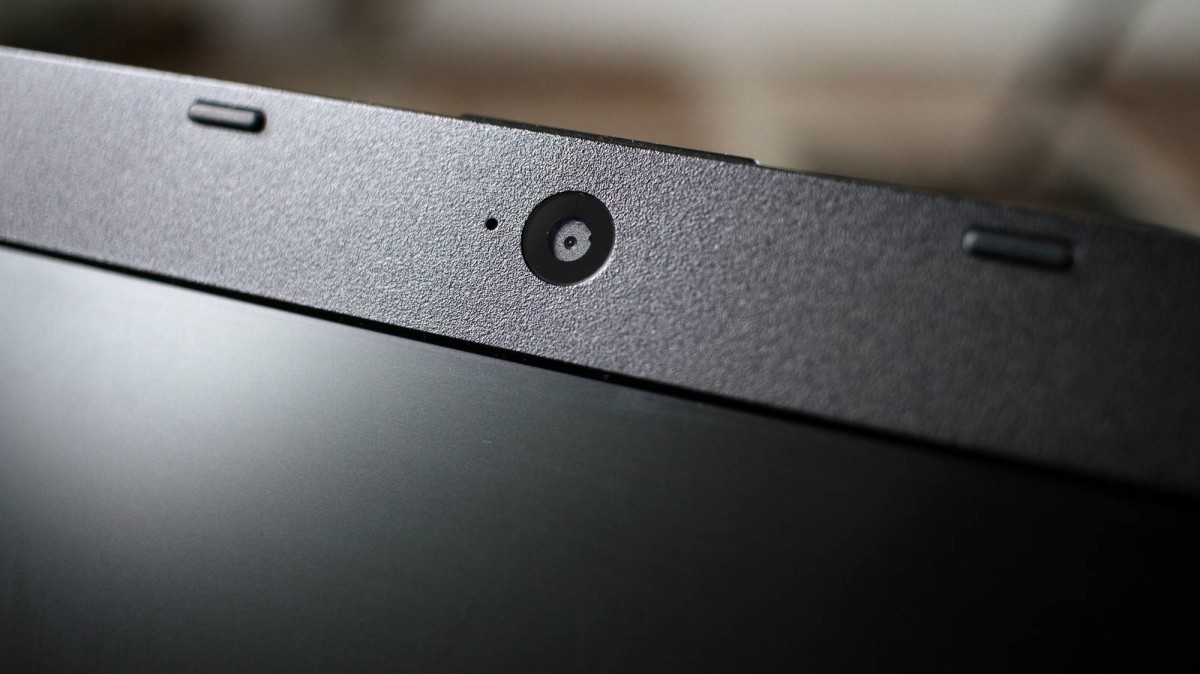
ربما لاحظ مستخدمو أجهزة الكمبيوتر المحمولة وجود فتحات صغيرة بجوار كاميرا الويب في الجزء العلوي من الشاشة، لكن ما قد يبدو للوهلة الأولى مجرد تصميم إضافي أو فتحة للميكروفون، قد يكون في بعض الأجهزة كاميرا ثانية مخصصة لتعزيز أمان تسجيل الدخول.

وبحسب مواقع إلكترونية، فإن أجهزة اللابتوب الحديثة قد تضم إلى جانب الكاميرا التقليدية مستشعرات وكاميرات إضافية، من بينها تلك التي تعمل بالأشعة تحت الحمراء، وتُستخدم ضمن نظام Windows Hello التابع لشركة مايكروسوفت.

كاميرا لا تلتقط الصور فقط

وتُستخدم الكاميرا الأساسية في أجهزة اللابتوب لإجراء مكالمات الفيديو والمؤتمرات والاجتماعات عن بُعد، بينما قد توجد إلى جانبها لمبة LED تشير إلى أن الكاميرا قيد التشغيل، فضلا عن أغطية مخصصة للكاميرا توفر طبقة إضافية من الخصوصية.

كما تضع الشركات المصنعة في المنطقة نفسها عادةً مصفوفات من الميكروفونات لالتقاط صوت المستخدم بوضوح، بعيدا نسبيا عن مكونات الجهاز التي قد تنتج ضوضاء، مثل مراوح التبريد.

لكن الفتحة الإضافية التي تبدو كأنها عدسة كاميرا أخرى قد تؤدي وظيفة أكثر أهمية، إذ يمكن أن تكون جزءا من منظومة Windows Hello للمصادقة البيومترية.

كيف تعمل تقنية Windows Hello؟

تتيح Windows Hello للمستخدم تسجيل الدخول إلى جهاز الكمبيوتر باستخدام وسائل بيومترية، مثل التعرف على الوجه أو بصمة الإصبع، بدلا من الاعتماد على كلمات المرور التقليدية.

وفي الأجهزة التي تدعم التعرف على الوجه، يمكن استخدام مستشعرات الأشعة تحت الحمراء لقراءة ملامح وجه المستخدم والتحقق من هويته، وتتميز هذه التقنية بإمكانية العمل حتى في ظروف الإضاءة المنخفضة أو الظلام.

وتأتي هذه الآلية في إطار الانتقال المتزايد نحو مفاتيح المرور (Passkeys)، وهي تقنية تعتمد على مفاتيح تشفير مرتبطة بجهاز المستخدم أو بوسيلة تحقق بيومترية، بدلا من تخزين كلمات مرور تقليدية يمكن سرقتها أو تخمينها.

لماذا توجد أكثر من كاميرا؟

عند إطلاق Windows Hello عام 2015، دعمت المنظومة وسائل مختلفة للتحقق من هوية المستخدم، من بينها مستشعرات بصمات الأصابع ومستشعرات الأشعة تحت الحمراء وأنظمة متعددة الكاميرات يمكنها إنشاء بيانات ثلاثية الأبعاد لملامح الوجه.

وأصبحت كاميرات الأشعة تحت الحمراء خيارا شائعا في أجهزة اللابتوب التي توفر خاصية تسجيل الدخول عبر الوجه، نظرا لقدرتها على العمل في ظروف الإضاءة الضعيفة.

إلا أن متطلبات الأمان تطورت لاحقا، فبعد معالجة مايكروسوفت ثغرة أمنية في عام 2025، أصبح تصميم بعض أنظمة التعرف على الوجه يعتمد على دمج بيانات الكاميرا الملونة مع بيانات الأشعة تحت الحمراء لتعزيز عملية التحقق من هوية المستخدم.

هل يصل Face ID إلى أجهزة MacBook؟

وفي سياق متصل، يظل انتقال تقنية Face ID إلى أجهزة MacBook موضوعا مطروحا منذ سنوات، خصوصا أن أجهزة iPhone وiPad تعتمد منذ فترة طويلة على منظومة TrueDepth للتعرف على الوجه.

ورغم انتشار هذه التقنية في الأجهزة المحمولة التابعة لشركة أبل، لم تعتمد الشركة حتى الآن نظام Face ID على أجهزة MacBook، التي لا تزال تستخدم Touch ID كإحدى وسائل المصادقة البيومترية.

وبذلك، فإن الفتحة الصغيرة الموجودة بجوار كاميرا اللابتوب قد لا تكون مجرد تفصيل في التصميم، ففي بعض الأجهزة، قد تكون جزءا من منظومة أمنية متطورة تعمل في الخلفية للتأكد من أن الشخص الذي يحاول تسجيل الدخول هو المستخدم المصرح له بالفعل.

  • كاميرا اللابتوب
  • كاميرات
  • كاميرات الهواتف الذكية
  • فتحة غامضة
  • وظيفة
  • وظيفة سرية
laptopwebcamprivacy
الخبر متوفّر باللغات التالية:English
المصدر الأصلي للخبر
البيان

A Mysterious Opening Next to the Laptop Camera.. What is its Secret Function?

September 25, 2026·Al Bayan
A Mysterious Opening Next to the Laptop Camera.. What is its Secret Function?

Maybe laptop users have noticed the small openings next to the webcam at the top of the screen, but what may seem like an extra design or microphone opening could be a second camera in some devices that enhances login security.

According to websites, modern laptops may include, besides the traditional camera, additional sensors and cameras, including those that work with infrared light, used within Microsoft’s Windows Hello system.

A camera that doesn't just take pictures

The main camera in laptops is used for video calls, conferences, and remote meetings, while there may be an LED lamp next to it indicating that the camera is on, as well as covers specifically designed for the camera that provide an extra layer of privacy.

Manufacturers also usually place arrays of microphones in the same area to capture the user’s voice clearly, far from components that may produce noise, such as cooling fans.

But the additional opening that looks like another camera lens could have a more important function; it could be part of the Windows Hello biometric authentication system.

How does the Windows Hello technology work?

Windows Hello allows users to log into their computer using biometric means, such as facial recognition or fingerprint scanning, instead of relying on traditional passwords.

In devices that support facial recognition, infrared sensors can be used to read the user's facial features and verify their identity. This technology is notable for its ability to function even in low-light conditions or complete darkness.

This mechanism is part of a growing shift towards passkeys, which are encryption keys linked to the user’s device or biometric verification method, rather than storing traditional passwords that can be stolen or guessed.

Why more than one camera?

When Windows Hello was launched in 2015, it supported various means of verifying a user's identity, including fingerprint sensors, infrared sensors, and multi-camera systems capable of creating 3D data for facial features.

Infrared cameras became a popular choice in laptops offering face login due to their ability to function in low-light conditions.

However, security requirements evolved later. After Microsoft addressed a security vulnerability in 2025, the design of some facial recognition systems began to rely on integrating color camera data with infrared data to enhance user identity verification processes.

Will Face ID reach MacBook devices?

In the same context, the transition of Face ID technology to MacBook devices has been a topic for years, especially since iPhone and iPad devices have long relied on the TrueDepth system for face recognition.

Although this technology is prevalent in Apple’s mobile devices, the company has not yet adopted the Face ID system on MacBooks, which still use Touch ID as one of their biometric authentication methods.

As such, the small opening next to the laptop camera may not just be a design detail. In some devices, it could be part of an advanced security system that works in the background to ensure that the person trying to log in is indeed the authorized user.

  • Laptop camera
  • Cameras
  • Smartphone cameras
  • Mysterious opening
  • Function
  • Secret function
laptopwebcamprivacy
This article is also available in:العربية
Original source article
Al Bayan