تعلم NotebookLM.. كيف تحوّل ملفاتك المعقدة إلى خريطة ذهنية تفاعلية؟ (12)

14 يوليو 2026·اليوم السابع
تعلم NotebookLM.. كيف تحوّل ملفاتك المعقدة إلى خريطة ذهنية تفاعلية؟ (12)

عندما يتعامل الباحث أو الطالب أو الموظف مع عشرات الصفحات من التقارير والكتب والملاحظات، يصبح فهم العلاقة بين المفاهيم المختلفة أكثر صعوبة من قراءة المحتوى نفسه، فالمعلومات لا تأتي دائمًا في تسلسل منطقي واضح، وقد تضيع الروابط المهمة بين الأفكار داخل مئات الصفحات.

هنا تأتي ميزة Mind Maps أو "الخرائط الذهنية" في NotebookLM، والتي تحول المحتوى المعقد إلى مخطط بصري تفاعلي يكشف كيف ترتبط الأفكار والمفاهيم والأحداث ببعضها البعض، مما يساعد المستخدم على استيعاب الصورة الكاملة بسرعة أكبر.

بدلًا من قراءة الملفات سطرًا بعد سطر، تقوم الأداة بتحليل المصادر واستخراج الموضوعات الرئيسية والفرعية، ثم تعرضها في شكل عقد مترابطة يمكن التنقل بينها بسهولة، وتسمح هذه الطريقة للمستخدم برؤية العلاقات بين المفاهيم التي قد تبدو منفصلة ظاهريًا، وهو ما يجعلها أداة مفيدة للطلاب والباحثين والصحفيين ومديري المشاريع الذين يحتاجون إلى فهم بنية المعلومات قبل التعمق في تفاصيلها.

كيف تنشئ خريطة ذهنية لمشروع بحثي خلال دقائق؟

إذا كنت تعمل على مشروع يحتوي على كمية كبيرة من المعلومات، يمكنك الاستفادة من الميزة عبر الخطوات التالية:

1- أنشئ دفتر ملاحظات جديدًا وارفع الملفات أو المصادر المرتبطة بموضوعك.

2- انتظر حتى تنتهي الأداة من معالجة المحتوى وتحليله.

3- انتقل إلى قسم أدوات الذكاء الاصطناعي واختر خيار Mind Map أو "الخريطة الذهنية".

4- سيقوم NotebookLM تلقائيًا بإنشاء مخطط بصري يوضح الموضوعات الرئيسية والعناصر المرتبطة بها.

5- يمكنك النقر على أي عنصر داخل الخريطة لاستكشاف التفاصيل أو الانتقال مباشرة إلى المصادر التي استندت إليها الأداة.
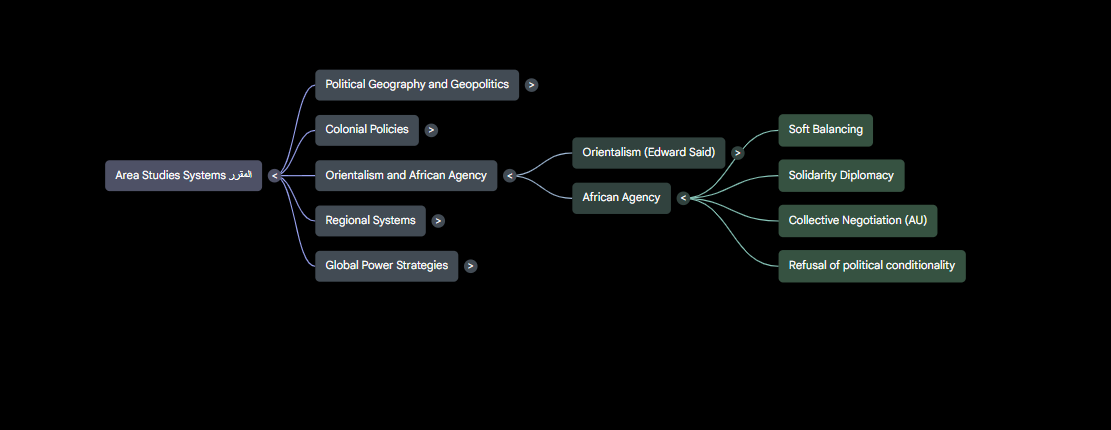
خريطة ذهنية
خريطة ذهنية

 كيف يستفيد الصحفيون والباحثون والطلاب من الخرائط الذهنية؟

لنفترض أن صحفيًا استقصائيًا يعمل على ملف يتضمن عشرات الوثائق المتعلقة بشركات وأشخاص ومعاملات مالية، بدلاً من التنقل بين الملفات يدويًا، يمكنه استخدام الخريطة الذهنية لرؤية العلاقات بين الكيانات المختلفة في لمحة واحدة، مما يساعده على اكتشاف الروابط المهمة وتحديد المسارات التي تستحق مزيدًا من التحقيق.

أما الباحث الأكاديمي الذي يدرس موضوعًا متعدد الجوانب، فيستطيع استخدام الخريطة الذهنية لفهم كيفية ارتباط النظريات والمفاهيم المختلفة ببعضها البعض، مما يسهل بناء إطار نظري متماسك ويمنحه رؤية أوضح قبل البدء في كتابة البحث.

أما الطالب فيتمكن من فهم المناهج والكتب والمقررات وتنظيم المذاكرة، وتكمن قوة هذه الميزة في أنها لا تكتفي بتلخيص المعلومات، بل تساعد المستخدم على فهم بنية المعرفة نفسها، وتحويل المحتوى المتشعب إلى صورة بصرية واضحة يمكن استيعابها خلال دقائق بدلًا من ساعات.


NotebookLMinteractivemindmap
الخبر متوفّر باللغات التالية:English
المصدر الأصلي للخبر
اليوم السابع

Learn NotebookLM: How to Convert Your Complex Files into Interactive Mind Maps? (12)

July 14, 2026·Youm7
Learn NotebookLM: How to Convert Your Complex Files into Interactive Mind Maps? (12)

When a researcher, student, or employee deals with dozens of pages of reports, books, and notes, understanding the relationship between different concepts becomes more difficult than reading the content itself. Information does not always come in a clear logical sequence, and important links between ideas can be lost within hundreds of pages.

Here comes the advantage of Mind Maps or "Mind Maps" in NotebookLM, which transforms complex content into an interactive visual diagram that reveals how ideas, concepts, and events are related to each other. This helps users grasp the big picture more quickly.

Instead of reading files line by line, the tool analyzes sources and extracts main and subtopics, then displays them in a form of interconnected nodes that can be easily navigated. This method allows the user to see relationships between concepts that may appear separate at first glance, making it a useful tool for students, researchers, journalists, and project managers who need to understand the structure of information before delving into its details.

How to Create a Mind Map for a Research Project in Minutes?

If you are working on a project with a large amount of information, you can take advantage of this feature through the following steps:

1. Create a new notebook and upload files or sources related to your topic.

2. Wait for the tool to finish processing and analyzing the content.

3. Go to the AI Tools section and select the Mind Map or "Mind Map" option.

4- NotebookLM will automatically create a visual chart illustrating the main topics and their associated elements.

5- You can click on any element within the map to explore details or go directly to the sources that the tool relied upon.

Mind Map
Mind Map

How journalists, researchers, and students can benefit from mind maps?

Let’s say an investigative journalist is working on a file containing dozens of documents related to companies, individuals, and financial transactions. Instead of manually navigating through the files, they can use the mind map to see the relationships between different entities at a glance, helping them discover important connections and identify paths that deserve further investigation.

An academic researcher studying a multifaceted topic can use the mind map to understand how different theories and concepts are interconnected, making it easier to build a coherent theoretical framework and providing a clearer picture before starting to write the research.

A student can use the mind map to understand curricula, books, and courses and organize their study. The strength of this feature is that it not only summarizes information but also helps users understand the structure of knowledge itself, turning complex content into a clear visual image that can be absorbed in minutes instead of hours.


NotebookLMinteractivemindmap
This article is also available in:العربية
Original source article
Youm7