كيفية فحص صحة بطارية آيفون وعدد دورات البطارية
18 أغسطس 2026·إنجاجيت
كيفية فحص صحة بطارية آيفون وعدد دورات البطارية

سيسعدك هذا الخبر إذا كنت تشتري هاتفًا مستعملًا

بقلم فيليبي إسبوسيتو 18 أغسطس، 2026 4:30 مساءً بتوقيت شرق الولايات المتحدة فيليبي إسبوسيتو لموقع Engadget

عند شرائك لهاتف آيفون جديد، تتوقع أن يدوم طويلاً. ومع ذلك، فإن جميع البطاريات القابلة لإعادة الشحن هي مكونات استهلاكية تتعرض للتدهور الكيميائي مع مرور الوقت. وعندما تتدهور البطارية، يمكنها الاحتفاظ بشحنة أقل، مما يؤثر في النهاية على الاستخدام اليومي لجهازك. توفر شركة آبل أدوات مدمجة تساعدك على مراقبة عدد الدورات -عدد مرات تفريغ البطارية وإعادة شحنها- وصحة البطارية بشكل عام. إن فهم هذه المقاييس أمر أساسي لمعرفة ما إذا كانت البطارية تعمل كما هو متوقع، أو عندما يحين الوقت لاستبدالها، أو لفهم حالة هاتف آيفون المستعمل قبل شرائه بشكل أفضل.

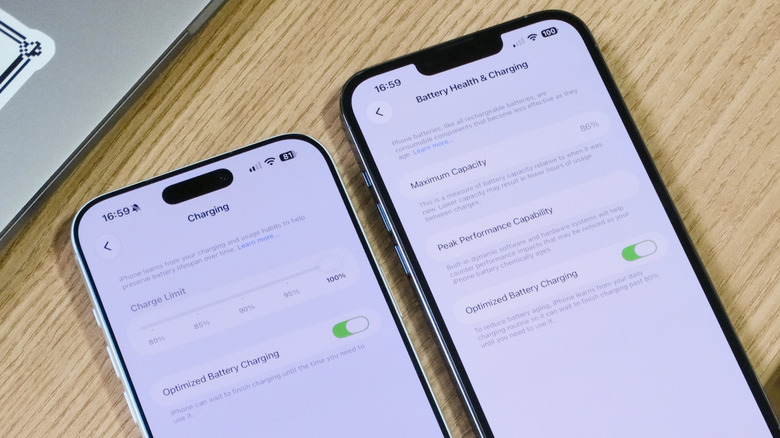
التحقق من صحة بطارية الآيفون عملية بسيطة للغاية. للبدء، افتح تطبيق الإعدادات على هاتفك الآيفون، وانقر على خيار البطارية وابحث عن قسم صحة البطارية. في بعض الطرازات القديمة، مثل آيفون 13، يُسمى هذا القسم "صحة البطارية والشحن". سيعرض لك هذا الشاشة تقديرًا لسعة بطارية الآيفون مقارنة بحالتها عندما كان جديدًا، إلى جانب معلومات مفيدة أخرى.

ما الذي تعنيه أرقام صحة البطارية في الواقع
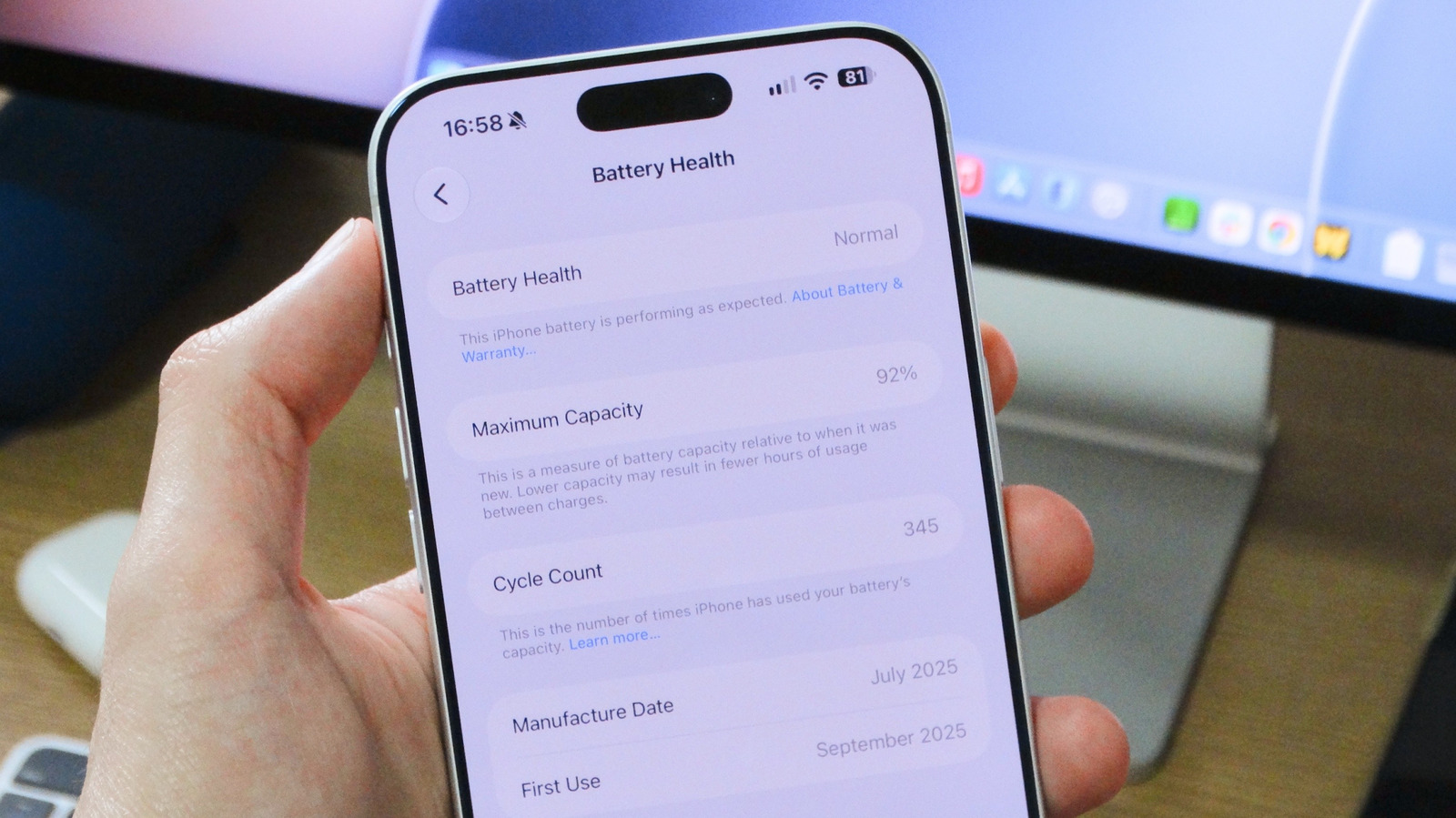
قائمة صحة البطارية على آيفون فيليبي إيسبوسيتو لموقع Engadget

تعطيك النسبة المئوية للقدرة القصوى فكرة أفضل عن الحالة العامة لبطارية هاتفك الآيفون. وفقًا لشركة أبل، يتم تصميم البطارية العادية للاحتفاظ بما يصل إلى 80 في المائة من قدرتها عند العمل في ظروف طبيعية. بالنسبة لطرازات آيفون 15 والأحدث، يستند هذا التقدير إلى 1000 دورة شحن كاملة. وبالنسبة للطرازات الأقدم، فإن التقدير هو أن البطارية ستدوم حتى 500 دورة قبل أن تتدهور بشكل كبير. وعندما تنخفض صحة البطارية عن 80 في المائة، قد يعمل هاتفك الآيفون لا يزال، ولكن من المرجح أن تلاحظ انخفاضًا ملحوظًا في عمر البطارية.

في بعض الحالات، قد تمكن iOS حتى ميزات إدارة الأداء الإضافية لمنع إغلاق iPhone بشكل غير متوقع بسبب تدهور البطارية بشدة. في هذه الحالة، سترى تحذيرًا أسفل قسم قدرة الأداء القصوى. إذا لم ترَ أي شيء، فمن المحتمل أن جهاز iPhone الخاص بك لم يواجه مشاكل في البطارية ولا يزال يعمل بأدائه الكامل.

لحفظ صحة بطارية iPhone، يمكنك تمكين خيار الشحن المُحسّن للبطارية في إعدادات البطارية. عندما يتم تمكينه، تتعلم هذه الميزة روتينك اليومي والوقت الذي تشحن فيه عادةً جهاز iPhone الخاص بك، بحيث تقوم مؤقتًا بوقف عملية الشحن عند 80% ولا تكمل الشحن إلى 100% إلا حول الوقت الذي تحتاج فيه إلى استخدام جهاز iPhone مرة أخرى. على iPhone 15 والأحدث، يمكنك أيضًا تحديد حد أقصى للشحن لجهازك، مما يساعد أيضًا في الحفاظ على صحة البطارية لفترة أطول.

كيفية التحقق من عدد دورات الشحن الخاصة بك ولماذا هذا مهم

إذا كان لديك هاتف iPhone 15 أو أحدث، توفر شركة آبل طريقة سهلة للتحقق من عدد دورات الشحن مباشرة في تطبيق الإعدادات. انتقل إلى Battery > Battery Health، واطّلع على الأسفل للعثور على عدد دورات شحن البطارية الخاصة بك. إذا كنت تستخدم نموذجًا أقدم، لا توفر شركة آبل إحصائيات دورات شحن البطارية بشكل أصلي. وهذا يعني أنه يتعين عليك الاعتماد على بدائل من أطراف ثالثة، مثل تطبيق Mac الشهير coconutBattery، للتحقق من عدد دورات شحن بطارية هاتف iPhone الخاص بك.

يمكن أن يكون معرفة عدد دورات شحن البطارية الخاصة بجهازك مفيدًا لفهم عمرها الافتراضي على المدى الطويل، وكذلك مدى استخدامك المكثف لجهازك. تُصنّف نماذج iPhone 15 وما بعدها للحفاظ على صحة جيدة لبطارية الهاتف لمدة تصل إلى 1000 دورة شحن كاملة قبل مواجهة مشكلات البطارية، في حين أن النماذج الأقدم مصنفة للحصول على ما يصل إلى 500 دورة. للإشارة، تعادل 1000 دورة عامين أو ثلاثة أعوام من الاستخدام في ظروف العالم الحقيقي.

تجدر الإشارة إلى أن الدورة الواحدة تمثل إنفاق 100% من سعة البطارية الحالية، على الرغم من أنه ليس بالضرورة كلها في وقت واحد. على سبيل المثال، إذا استخدمت 50٪ من بطاريتك، وشحنت جهازك ثم استخدمت 50٪ أخرى بعد ذلك، فإن ذلك يُعد دورة شحن كاملة واحدة.

لا يعني الوصول إلى هذه الأرقام أن بطارية آيفون ستتوقف تلقائيًا، ولكنها تعني عادةً انخفاض سعتها، لذا قد تلاحظ عمرًا أقصر للبطارية. إذا كانت صحة بطارية آيفون أقل من 80% أو إذا وصلت إلى 1000 دورة شحن، فيجب عليك التفكير في استبدال البطارية للحفاظ على عمل هاتفك بسلاسة. لكي تفعل ذلك، فإن أفضل خيار لديك هو الاتصال بدعم آبل لترتيب الاستبدال.

iPhonebatteryhealth
الخبر متوفّر باللغات التالية:English
المصدر الأصلي للخبر
إنجاجيت

How to check your iPhone's battery health and cycle count

August 18, 2026·Engadget
How to check your iPhone's battery health and cycle count

You'll be glad to know if you're buying used.

By Filipe Espósito Aug. 18, 2026 4:30 pm EST Filipe Espósito for Engadget

When you buy a new iPhone, you expect it to last. However, all rechargeable batteries are consumable components that chemically degrade over time. As a battery degrades, it can hold less charge, which ultimately affects your device's daily use. Apple provides built-in tools that help you monitor cycle count — the number of full discharges and recharges it has undergone — and overall battery health. Understanding these metrics is essential for knowing if the batter is working as expected, when it might be time for a replacement or for better understanding the condition of a used iPhone before you buy it.

Checking your iPhone's battery health is a pretty simple process. To get started, open the Settings app on your iPhone, tap Battery and look for the Battery Health section. On some older models, such as the iPhone 13, this section is called Battery Health & Charging. This screen will show you an estimate of your iPhone's battery capacity relative to when it was new, along with other useful information.

What the health numbers actually mean

Battery Health menu on the iPhone Filipe Espósito for Engadget

The Maximum Capacity percentage gives you a better idea of the overall condition of your iPhone's battery. According to Apple, a typical battery is designed to retain up to 80 percent of its capacity when operating under normal conditions. For the iPhone 15 and later models, this estimate is based on 1,000 full charge cycles. For older models, the estimate is that the battery will last up to 500 cycles before degrading significantly. When the battery health drops below 80 percent, your iPhone may still work, but you'll likely notice a significant decrease in battery life.

In some cases, iOS may even enable additional performance management features to prevent the iPhone from shutting down unexpectedly due to a severely degraded battery. In that case, you'll see a warning below the Peak Performance Capability section. If you don't see anything, it likely means your iPhone hasn't had any battery issues and is still running at full performance.

To help preserve your iPhone's battery health, you can enable the Optimized Battery Charging option in the battery settings. When enabled, this feature learns your daily routine and when you typically charge your iPhone, so that it temporarily pauses charging at 80 percent and only completes the charge to 100 percent around the time you need to use your iPhone again. On the iPhone 15 and later, you can also set a maximum charge limit for your device, which also helps preserve battery health for longer.

How to check your cycle count and why it matters

If you have an iPhone 15 or newer, Apple provides an easy way to check the cycle count directly in the Settings app. Go to Battery > Battery Health, and scroll down to find your cycle count. If you're using an older model, Apple doesn't provide battery cycle statistics natively. This means you'll have to rely on third-party alternatives, such as the popular Mac app coconutBattery, to check your iPhone's battery cycle count.

Knowing your device's battery cycle count can be helpful for understanding its long-term lifespan, as well as how heavily you've been using your device. iPhone 15 models and later are rated to retain good battery health for up to 1,000 full charge cycles before experiencing battery issues, while older models are rated for up to 500 cycles. For reference, 1,000 cycles works out to two or three years' use in under real-world conditions.

Keep in mind that one cycle represents expending 100 percent of your battery's current capacity, though not necessarily all at once. For example, if you used 50 percent of your battery, recharged your device and then used another 50 percent afterward, that counts as one complete charge cycle.

Reaching these numbers doesn't mean your iPhone's battery will automatically fail, but it does mean its capacity will typically be lower, so you may notice shorter battery life. If your iPhone's battery health is below 80 percent or if it has reached 1,000 charge cycles, you should consider replacing the battery to keep your phone running smoothly. To do so, your best option is to contact Apple Support to arrange for a replacement.

iPhonebatteryhealth
This article is also available in:العربية
Original source article
Engadget