لماذا تظهر علامة تعجب بجوار الواي فاي في هاتفك؟
18 نوفمبر 2026·البيان
لماذا تظهر علامة تعجب بجوار الواي فاي في هاتفك؟

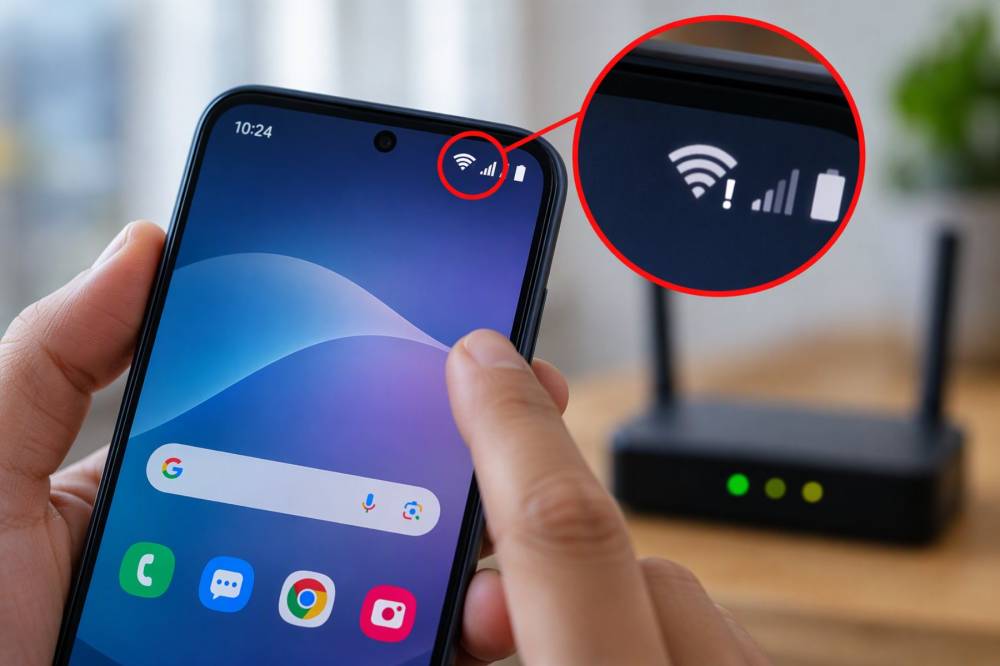
قد يلاحظ مستخدمو هواتف أندرويد ظهور علامة تعجب (!) بجوار رمز شبكة الواي فاي أعلى شاشة الهاتف، وهو مؤشر قد يثير التساؤلات بشأن وجود مشكلة في الاتصال، خاصة عندما يبدو الهاتف متصلاً بالشبكة رغم تعذر تصفح الإنترنت.

وبحسب تقرير نشره موقع SlashGear، فإن ظهور هذه العلامة يعني عادةً أن الهاتف متصل بشبكة الواي فاي، لكنه لا يستطيع الوصول إلى الإنترنت، أو أن الاتصال المتاح محدود، ما يشير إلى وجود خلل في الاتصال بين الشبكة والإنترنت.

أسباب ظهور علامة التعجب بجوار الواي فاي

تتعدد الأسباب المحتملة لظهور هذه العلامة، أبرزها انقطاع خدمة الإنترنت لدى مزود الخدمة، أو وجود مشكلة في جهاز التوجيه (الراوتر) تمنعه من الاتصال بالإنترنت بصورة طبيعية، وفي بعض الحالات، قد تكون المشكلة مرتبطة بالهاتف نفسه، وليس بالشبكة.

ويمكن للمستخدم تحديد مصدر المشكلة بسهولة من خلال تجربة الاتصال بالإنترنت باستخدام جهاز آخر متصل بشبكة الواي فاي نفسها، فإذا تمكن الجهاز الآخر من تصفح الإنترنت دون مشكلات، فمن المرجح أن يكون الخلل في إعدادات الهاتف.

خطوات بسيطة لاستعادة الاتصال بالإنترنت

يوصي التقرير بتجربة عدد من الحلول الأولية، من بينها إيقاف تشغيل الواي فاي وإعادة تشغيله، أو إعادة تشغيل الهاتف، أو حذف الشبكة من قائمة الشبكات المحفوظة ثم الاتصال بها مجدداً.

كما يمكن اللجوء إلى إعادة ضبط إعدادات الشبكة في الهاتف، مع مراعاة أن هذه الخطوة قد تتطلب إعادة إدخال بيانات شبكات الواي فاي المحفوظة وإعادة إقران أجهزة البلوتوث.

أما إذا كانت المشكلة في الراوتر، فيمكن إعادة تشغيله والتحقق من مؤشرات الحالة الموجودة عليه، إذ تتضمن بعض الأجهزة مؤشرات منفصلة توضح حالة اتصال الواي فاي والاتصال بالإنترنت، وإذا استمر الخلل، فقد يكون من الضروري التواصل مع مزود خدمة الإنترنت.

لماذا تظهر العلامة عند الاتصال بشبكات الأماكن العامة؟

لا تعني علامة التعجب دائماً وجود عطل في الشبكة، فقد تظهر عند الاتصال بشبكات الواي فاي العامة في المقاهي والمطارات، بسبب الحاجة إلى تسجيل الدخول أولاً عبر صفحة مخصصة للمصادقة.

وفي هذه الحالة، يرسل الهاتف عادةً إشعاراً يتيح فتح صفحة تسجيل الدخول وإدخال البيانات المطلوبة، قبل السماح باستخدام الإنترنت.

تحديث أندرويد قد يكون الحل الأخير

ومن الحلول السريعة التي يمكن تجربتها تفعيل وضع الطيران لبضع ثوانٍ ثم إيقافه، لإعادة تنشيط اتصالات الهاتف، وهي خطوة قد تساعد على معالجة بعض مشكلات الاتصال دون الحاجة إلى إعادة تشغيل الجهاز.

وإذا استمرت علامة التعجب في الظهور عند الاتصال بشبكات واي فاي مختلفة، ينصح بالتحقق من وجود تحديثات جديدة لنظام أندرويد، إذ لا تقتصر أهمية هذه التحديثات على إضافة مزايا جديدة، بل تشمل أيضاً إصلاح الأخطاء البرمجية وتحسين استقرار الاتصال.

إن ظهور علامة التعجب بجوار رمز الواي فاي ليس بالضرورة مؤشراً على عطل في الهاتف، بل هو تنبيه إلى أن الاتصال بالشبكة لا يضمن بالضرورة إمكانية الوصول إلى الإنترنت.

AndroidWiFiNotifications
الخبر متوفّر باللغات التالية:English
المصدر الأصلي للخبر
البيان

Why is there an exclamation point next to WiFi on my phone?

November 18, 2026·Al Bayan
Why is there an exclamation point next to WiFi on my phone?

Android phone users may notice an exclamation mark (!) next to the Wi-Fi symbol at the top of their phone screen. This indicator can raise questions about a possible connection problem, especially when it seems that the phone is connected to the network but cannot browse the internet.

According to a report published by SlashGear, this mark usually means that the phone is connected to Wi-Fi but cannot access the internet, or that the available connection is limited, indicating a problem with the connection between the network and the internet.

Causes of the exclamation mark next to Wi-Fi

There are several possible reasons for this symbol to appear. The most common ones include an internet service outage from the provider, or a problem with the router preventing it from connecting to the internet normally. In some cases, the issue may be related to the phone itself rather than the network.

Users can easily determine the source of the problem by trying to connect to the internet using another device connected to the same Wi-Fi network. If the other device can browse the internet without problems, it is likely that the issue lies in the settings of the phone.

Simple steps to restore internet connection

The report recommends trying a number of initial solutions, including turning Wi-Fi off and on again, restarting the phone, or deleting the network from the list of saved networks and reconnecting to it.

It is also possible to reset the phone’s network settings, but this step may require re-entering saved Wi-Fi networks and reconnecting Bluetooth devices.

If the problem is with the router, it can be restarted and its status indicators checked. Some devices have separate indicators for Wi-Fi connection status and internet connectivity. If the issue persists, contacting the Internet Service Provider may be necessary.

Why does the exclamation mark appear when connecting to public networks?

The exclamation mark doesn’t always indicate a network problem; it can appear when connecting to public Wi-Fi networks in cafes and airports because you need to log in first through a dedicated authentication page.

In this case, the phone usually sends a notification that opens the login page and allows entering the required data before allowing internet use.

Android update may be the last resort

One quick solution to try is enabling flight mode for a few seconds and then turning it off, which can reactivate the phone’s connections. This step may help resolve some connectivity issues without needing to restart the device.

If the exclamation mark continues to appear when connecting to different Wi-Fi networks, it is recommended to check for Android system updates. These updates are not only important for adding new features but also include fixing software bugs and improving connection stability.

The appearance of an exclamation mark next to the Wi-Fi symbol does not necessarily indicate a problem with the phone; rather, it is a warning that the connection to the network does not guarantee internet access.

AndroidWiFiNotifications
This article is also available in:العربية
Original source article
Al Bayan