كيفية إضافة البلوتوث إلى جهاز تلفزيون لا يحتوي عليه
24 أغسطس 2026·إنجاجيت
كيفية إضافة البلوتوث إلى جهاز تلفزيون لا يحتوي عليه

انظروا، لقد مللنا من سماع برامجكم تتردد في أنحاء المنزل.

بقلم عدنان أحمد 24 آب/أغسطس 2026 2:00 مساءً بتوقيت شرق الولايات المتحدة chaiwarin/Shutterstock

قد نتلقى عمولة على المشتريات التي تتم من خلال الروابط.

مع التحديثات الصوتية الصحيحة وجهاز البث الذي يفتح عالم المحتوى المطلوب، يمكن لمعظم أجهزة التلفزيون أن تدوم لفترة طويلة جداً. بالطبع، هناك تحديثات معينة يصعب تجاهلها - الاتصال اللاسلكي أحد هذه الأشياء. أصبح البلوتوث شائعاً في معظم أجهزة التلفزيون الآن، حيث تعتمد العديد من أجهزة التحكم عن بعد بالأشعة تحت الحمراء على التكنولوجيا أيضاً. إذا اشتريت جهاز التلفزيون خلال العقد الماضي، فمن المحتمل أنه يأتي مع دعم البلوتوث. اذهب إلى قائمة الإعدادات وابحث عن خيارات الاتصال التي تذكر البلوتوث أو الأجهزة أو الإكسسوارات اللاسلكية.

إذا كنت تملك جهاز تلفزيون بدون دعم البلوتوث، فهذا لا يعني بالضرورة أنك خسرت. جميع أجهزة البث الشهيرة تقريباً، مثل آبل تي في، روكو أو فاير تي في ستيك، تحتوي على البلوتوث كميزة قياسية. إذا كنت تملك سماعات رأس لاسلكية أو لوحة مفاتيح، يمكنك توصيلها مباشرة بجهاز البث. بسعر 30 دولاراً، يعد روكو ستيمينغ ستيك إتش دي أحد أكثر الطرق بأسعار معقولة ليس فقط لإضافة دعم البلوتوث إلى جهاز التلفزيون الخاص بك ولكن أيضاً لإضفاء بعض الحياة الجديدة عليه بنظام تشغيل حديث.

الجانب السلبي الكبير الوحيد في استخدام جهاز البث هو أن أجهزة بلوتوث الخاصة بك ستعمل فقط عندما يكون التلفزيون مضبوطًا على مصدر الإدخال هذا. إذا عدت إلى أي جهاز آخر متصل أيضًا بالتلفزيون، فسيتم تشغيل الصوت مرة أخرى من مكبرات صوت التلفزيون. إذا كنت تبحث عن حل أكثر عالمية، فإن اختيار جهاز إرسال بلوتوث مخصص هو الخيار الأفضل.

كيف يعمل جهاز إرسال البلوتوث؟
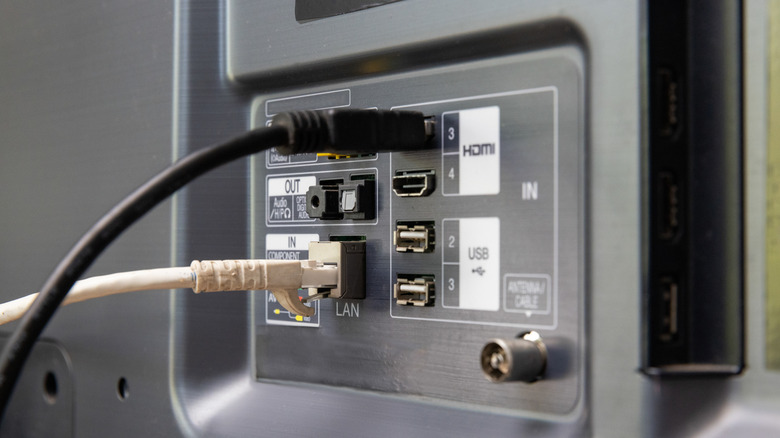
مدخلات ومخرجات الصوت في الجزء الخلفي من جهاز التلفزيون. Toa55/Shutterstock

يقوم أجهزة إرسال البلوتوث بما تتوقعه بالضبط - فهي تنقل الصوت من جهاز لا يدعم البلوتوث بشكل أصلي إلى زوج من سماعات الرأس أو السمعية اللاسلكية. عملية الإعداد بسيطة نسبيًا. قم بتوصيل جهاز إرسال البلوتوث بمخرج الصوت في جهاز التلفزيون، ثم ضع كل من جهاز الإرسال وسماعات الرأس في وضع الاقتران، وانتظر حتى يتصل بهما. يقوم جهاز التلفزيون بعد ذلك بإرسال إشارة الصوت الخاصة به إلى جهاز الإرسال، والذي يحولها إلى إشارة بلوتوث تستقبلها سماعات الرأس.

اعتماداً على نموذج جهاز التلفزيون الخاص بك، يمكنك العثور على أجهزة إرسال بلوتوث التي تقبل الصوت عبر المنفذ الضوئي أو منفذ سماعات الرأس 3.5 ملم أو مخرجات RCA. ستحتاج أيضًا إلى توصيل المحول بمصدر طاقة - عادة ما يقوم منفذ USB المتاح على جهاز التلفزيون بعمل ذلك. يمكنك العثور على هذه المحولات بأسعار مختلفة عبر الإنترنت، مع خيارات جيدة حوالي 25 دولارًا.

ابحث عن أجهزة الإرسال التي تأتي مع أكواد أحدث مثل aptX منخفضة التأخير، والتي يمكن أن تساعد في تقليل التأخير بين ما يحدث على الشاشة وما تسمعه عبر سماعات الرأس الخاصة بك.

TVBluetoothaudio
الخبر متوفّر باللغات التالية:English
المصدر الأصلي للخبر
إنجاجيت

How to add Bluetooth to a TV that doesn't have it

August 24, 2026·Engadget
How to add Bluetooth to a TV that doesn't have it

Look, we're all tired of hearing your shows echo through the house.

By Adnan Ahmed Aug. 24, 2026 2:00 pm EST chaiwarin/Shutterstock

We may receive a commission on purchases made from links.

With the right audio upgrades and a streaming device that unlocks the world of on-demand content, most televisions can last a very long time. Of course, there are certain upgrades that are harder to ignore — wireless connectivity being one of them. Bluetooth has become mainstream in most televisions now, with many infrared remote controls relying on the technology too. If you've purchased your TV in the past decade, there's a good chance it comes with Bluetooth support. Head to the settings menu and look for connectivity options that mention Bluetooth, wireless devices or accessories.

If you do own a television without support for Bluetooth, you're not necessarily out of luck. Pretty much all popular streaming devices, like the Apple TV, Roku or Fire TV Stick, feature Bluetooth as a standard feature. If you own a pair of wireless headphones or a keyboard, you can connect them directly to the streaming device. At $30, the Roku Streaming Stick HD is one of the most affordable ways to not just add Bluetooth support to your TV but also breathe some new life into it with a modern OS.

The only big downside of going the streaming device route is that your Bluetooth accessories will only work when your TV is set to that particular input source. If you switch back to any other device that's also connected to your TV, the sound will once again play from the TV's speakers. If you're looking for a more universal solution, picking up a dedicated Bluetooth transmitter is the better option.

How does a Bluetooth transmitter work?

Audio inputs and outputs on the back of a TV. Toa55/Shutterstock

Bluetooth transmitters do exactly what you'd expect — they carry over the audio from a device that doesn't have native Bluetooth support to a pair of wireless headphones or earbuds. The setup process is relatively straightforward. You plug the Bluetooth transmitter into your TV's audio output, put both the transmitter and your headphones into pairing mode, and wait for them to connect. Your TV then feeds its audio signal into the transmitter, which converts it into a Bluetooth signal that your headphones receive.

Depending on your TV model, you can find Bluetooth transmitters that accept audio through the optical port, a 3.5mm headphone jack or RCA outputs. You'll also need to plug the adapter into a power source — an available USB port on your TV usually does the job. You can find these adapters at various price points online, with decent options at around $25.

Look for transmitters that come with newer codecs like aptX Low Latency, which can help reduce the delay between what's happening on screen and what you hear through your headphones.

TVBluetoothaudio
This article is also available in:العربية
Original source article
Engadget